For the complete documentation index, see llms.txt. This page is also available as Markdown.

Generate from template

When to use the Create from Template endpoint and how to choose the parameters that control the generated output.

POST /v1.0/generations/from-template adapts, remixes, or transforms an existing Gamma. The template's structure is preserved by default and changes only when your prompt asks. The sections below explain how each parameter shapes the output.

For the exact request body, field types, and polling response schema, see POST /generations/from-template and GET /generations/{id}.

Quick reference

  • gammaId and prompt are required.

  • title lets you set the generated Gamma title directly instead of relying on the template name or inferred content.

  • The template Gamma must contain exactly one page.

  • Use themeId, folderIds, exportAs, and sharingOptions the same way you would in the standard generation flow.

  • Poll GET /v1.0/generations/{generationId} to retrieve gammaUrl, exportUrl, and credit usage.

What you can ask for

The prompt parameter is the same instruction surface as the Remix feature in the Gamma app, and it supports a broader set of operations than "fill in the blanks". You can adapt content for a new audience, transform the subject, add or remove cards, lock specific cards, and more.

Category
Example prompt

Tailoring to an audience

Adapt this pitch deck for a healthcare audience, highlighting regulatory compliance, patient safety, and clinical outcomes

Replacing or transforming content

Using this lesson plan about climate change, create a new one about clean energy

Variables & placeholders

Replace all instances of [[client-name]] with Acme Corp and update the contact information

Referencing cards

On card 9, update the pricing information with the new rates

Adding cards

After the introduction, create three case study cards using the template and content below

Removing cards

Remove the team bios section and the duplicate intro slide at the start

"Locking" cards

Do not edit the title card, team bios, or thank you slide — they should stay exactly as written

Images

Use this logo to replace the placeholder image on the title slide (include image URLs in your prompt)

Populating from data

Fill out the client overview card using their responses from this intake form

Reordering cards

Reorder the sections so that "Our Solution" comes before "The Problem" and move the case studies to the end

Combine these patterns in a single prompt, or describe the outcome you want and let Gamma figure out the operations. Placeholder tokens like [[client-name]] are a convention, not a requirement of the endpoint — any notation works as long as your intent is clear.

Top-level parameters

title (optional)

Sets the title of the generated Gamma at creation time.

  • Use this when the output should have a specific title that differs from the source template name.

  • Character limits: 1-500.

  • If omitted, Gamma infers the title from the generated content.


gammaId (required)

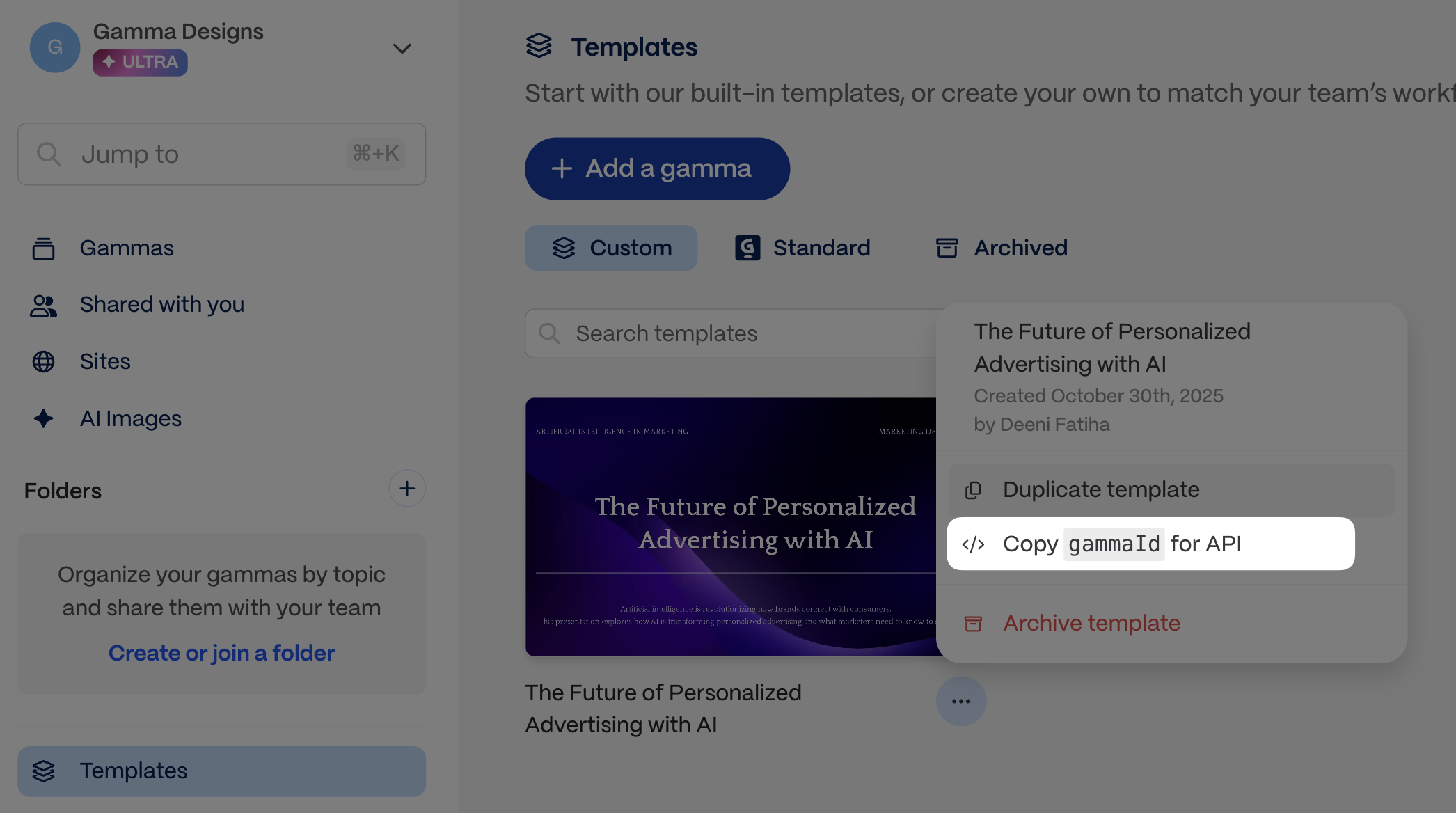
Identifies the template you want to modify. You can find and copy the gammaId for a template as shown in the screenshots below.

Finding the gamma ID for a template
Copy the template Gamma ID from the app before you make the request.

Template must have exactly one page
Create from Template works best when the source Gamma has exactly one page.
prompt (required)

Use this parameter to send text content, image URLs, as well as instructions for how to use this content in relation to the template gamma.

Add images to the input

You can provide URLs for specific images you want to include. Simply insert the URLs into your content where you want each image to appear (see example below). You can also add instructions for how to display the images, eg, "Group the last 10 images into a gallery to showcase them together."

Token limits

The total token limit is 100,000, which is approximately 400,000 characters, but because part of your input is the gamma template, in practice, the token limit for your prompt becomes shorter. We highly recommend keeping your prompt well below 100,000 tokens and testing out a variety of inputs to get a good sense of what works for your use case.

Other tips

  • Text can be as little as a few words that describe the topic of the content you want to generate.

  • You can also input longer text -- pages of messy notes or highly structured, detailed text.

  • You may need to apply JSON escaping to your text. Find out more about JSON escaping and try it out here.


themeId (optional, defaults to workspace default theme)

Defines which theme from Gamma will be used for the output. Themes determine the look and feel of the gamma, including colors and fonts.

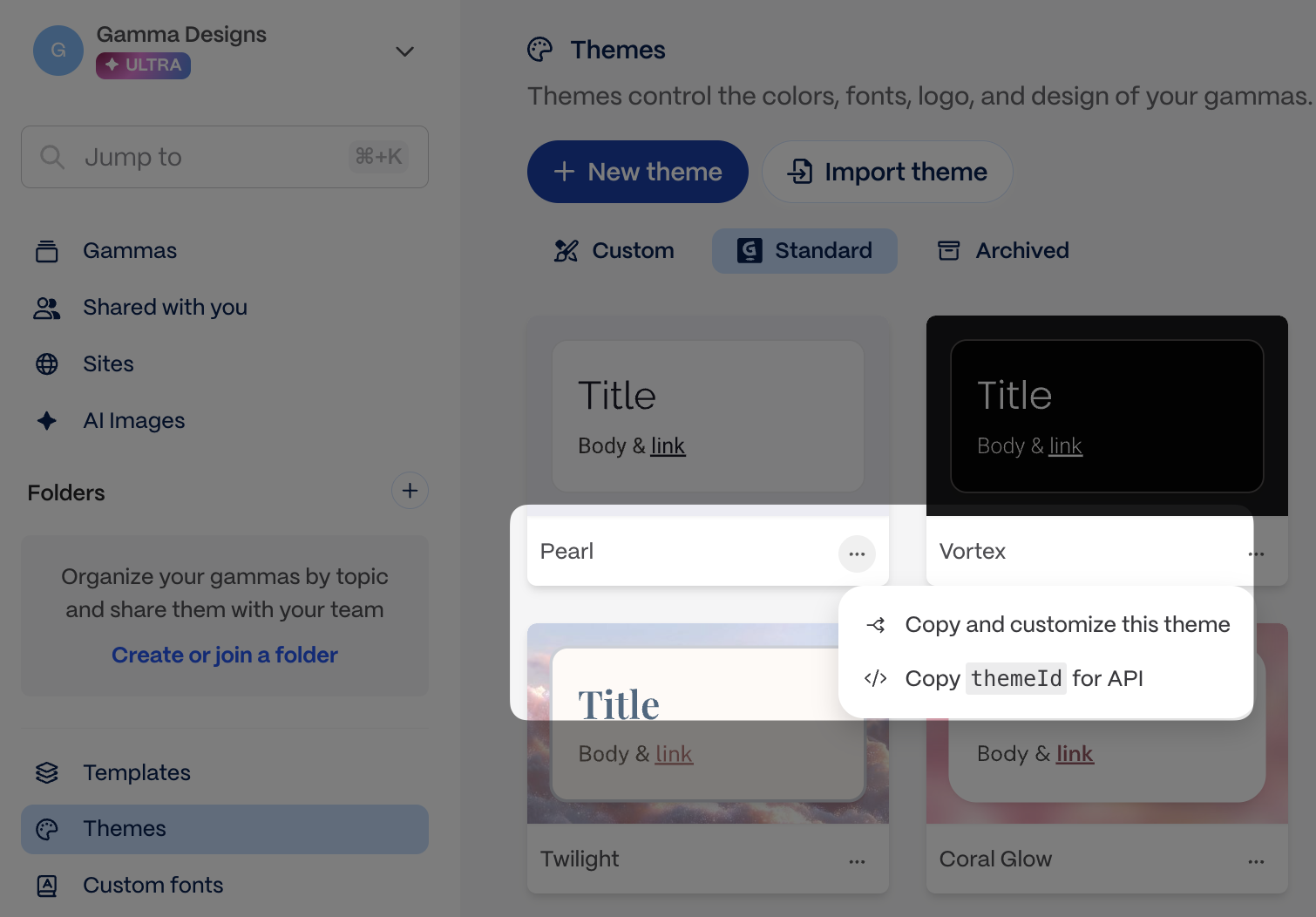
  • Use GET /v1.0/themes to list themes from your workspace, or copy the theme ID directly from the app.

Theme ID location in Gamma
Copy the theme ID from the app

folderIds (optional)

Defines which folder(s) your gamma is stored in.

  • Use GET /v1.0/folders to list folders, or copy the folder ID directly from the app.

  • You must be a member of a folder to add gammas to it.

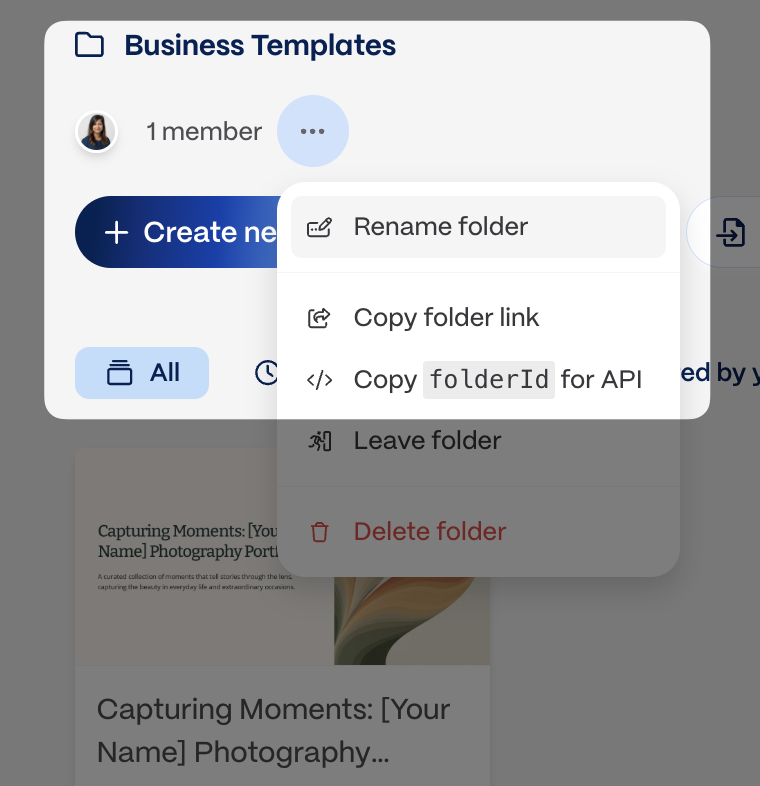
Folder ID location in Gamma
Copy the folder ID from the app

exportAs (optional)

Indicates if you'd like to return the generated gamma as an exported file as well as a Gamma URL.

  • Options are pdf, pptx, or png

  • png returns a .zip with one PNG per card, not a single image file.

  • Export URLs expire after approximately one week and are not tied to your API key — anyone with the link can download the file until then, so treat it as a secret and download promptly after generation completes.

  • If you do not wish to directly export via the API, you may always do so later via the app.


imageOptions

When you create content from a Gamma template, new images automatically match the image source used in the original template. For example if you used Pictographic images to generate your original template, any new images will be sourced from Pictographic.

For templates with AI-generated images, you can override the default AI image settings using the optional model and style fields below.

imageOptions.model (optional)

This field is relevant if the imageOptions.source chosen is aiGenerated. The imageOptions.model parameter determines which model is used to generate images.

  • You can choose from the models listed in Image model accepted values.

  • If no value is specified for this parameter, Gamma automatically selects a model for you.

imageOptions.style (optional)

This field is relevant if the imageOptions.source chosen is aiGenerated. The imageOptions.style parameter influences the artistic style of the images generated. While this is an optional field, we highly recommend adding some direction here to create images in a cohesive style.

  • You can add one or multiple words to define the visual style of the images you want.

  • Adding some direction -- even a simple one word like "photorealistic" -- can create visual consistency among the generated images.

  • Character limits: 1-5000.


sharingOptions

sharingOptions.workspaceAccess (optional, defaults to workspace setting)

Determines level of access members in your workspace will have to your generated gamma.

  • Options are: noAccess, view, comment, edit, fullAccess

  • fullAccess allows members from your workspace to view, comment, edit, and share with others.

When omitted, Gamma applies the workspace default. Admins set it at Settings > Sharing under "Default workspace sharing permission for new gammas." Setting the default to "No access" makes every new gamma private without needing to pass noAccess on every API call. Explicit values in the API request always override the workspace default.

sharingOptions.externalAccess (optional, defaults to workspace setting)

Determines level of access members outside your workspace will have to your generated gamma.

  • Options are: noAccess, view, comment, or edit

When omitted, Gamma applies the workspace default. Admins set it at Settings > Sharing under "Default link sharing permission for new gammas." Setting the default to "No access" disables link sharing by default. Explicit values in the API request always override the workspace default.

sharingOptions.emailOptions (optional)

Allows you to share your gamma with specific recipients via their email address.

sharingOptions.emailOptions.access (optional)

Determines level of access those specified in sharingOptions.emailOptions.recipients have to your generated gamma. Only workspace members can have fullAccess

  • Options are: view, comment, edit, or fullAccess

  • Generate from text if you want Gamma to determine the layout from scratch

  • Poll for results for the polling flow after template generation starts

  • API Overview for a side-by-side comparison of generation workflows

Last updated

Was this helpful?