# Gamma Developer Docs

Build with the Gamma API — generate presentations, documents, websites, and social posts programmatically.

{% columns %}
{% column valign="middle" %}
One API call. Polished presentations, documents, websites, and social posts — branded, exported, and shared.

<a href="https://gamma.app/settings/api-keys" class="button primary">Get your API key</a><a href="/pages/fqXKjrhDFl3HdhKmoAS3" class="button secondary">API overview</a>
{% endcolumn %}

{% column %}

<figure><img src="/files/Dy9Oo9jED8XLh6qQilx2" alt="" width="300"><figcaption></figcaption></figure>
{% endcolumn %}
{% endcolumns %}

## Authentication

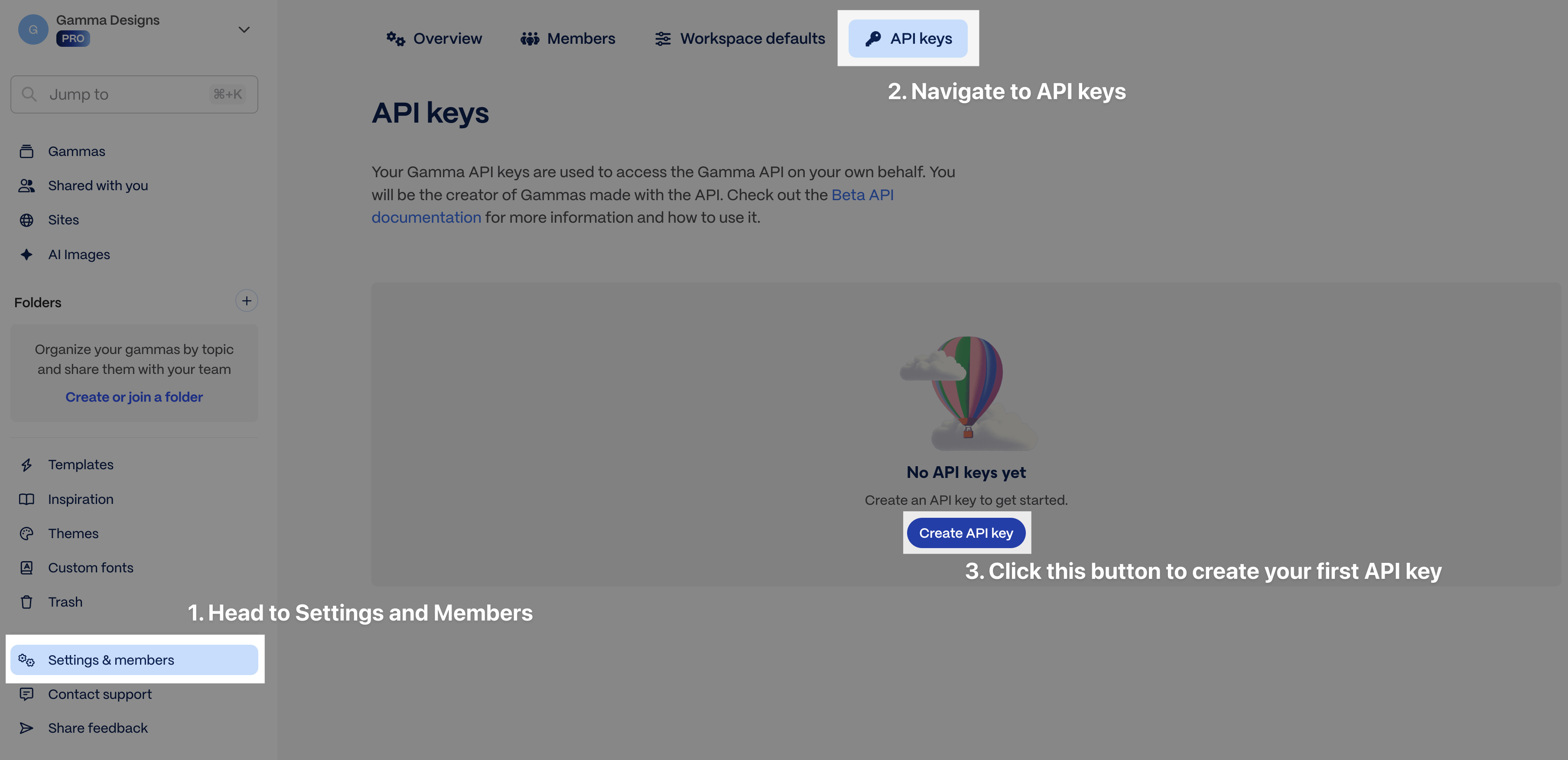
All requests require an API key in the `X-API-KEY` header. Generate a key from [Account Settings > API Keys](https://gamma.app/settings/api-keys).

| Header         | Value              | Required |
| -------------- | ------------------ | -------- |
| `X-API-KEY`    | Your API key       | Yes      |
| `Content-Type` | `application/json` | Yes      |

API key access requires a Pro, Ultra, Teams, or Business plan. [Some connectors](/connectors/connectors-and-integrations) work on all plans and do not require an API key.

{% hint style="info" %}
**Machine-readable docs** are available at [developers.gamma.app/llms.txt](https://developers.gamma.app/llms.txt) and [developers.gamma.app/llms-full.txt](https://developers.gamma.app/llms-full.txt). Every page is also available as markdown by appending `.md` to the URL.
{% endhint %}

## Quickstart

### 1. Start a generation

{% tabs %}
{% tab title="cURL" %}

```bash
curl -X POST https://public-api.gamma.app/v1.0/generations \
  -H "Content-Type: application/json" \
  -H "X-API-KEY: $GAMMA_API_KEY" \
  -d '{
    "inputText": "Q3 product launch strategy",
    "textMode": "generate",
    "format": "presentation",
    "numCards": 10,
    "exportAs": "pdf"
  }'
```

{% endtab %}

{% tab title="Python" %}

```python
import requests, os

response = requests.post(
    "https://public-api.gamma.app/v1.0/generations",
    headers={
        "X-API-KEY": os.environ["GAMMA_API_KEY"],
        "Content-Type": "application/json",
    },
    json={
        "inputText": "Q3 product launch strategy",
        "textMode": "generate",
        "format": "presentation",
        "numCards": 10,
        "exportAs": "pdf",
    },
)
generation_id = response.json()["generationId"]
```

{% endtab %}

{% tab title="JavaScript" %}

```javascript
const response = await fetch(
  "https://public-api.gamma.app/v1.0/generations",
  {
    method: "POST",
    headers: {
      "Content-Type": "application/json",
      "X-API-KEY": process.env.GAMMA_API_KEY,
    },
    body: JSON.stringify({
      inputText: "Q3 product launch strategy",
      textMode: "generate",
      format: "presentation",
      numCards: 10,
      exportAs: "pdf",
    }),
  }
);
const { generationId } = await response.json();
```

{% endtab %}
{% endtabs %}

{% code title="Response" %}

```json
{
  "generationId": "abc123xyz"
}
```

{% endcode %}

### 2. Poll for the result

Poll `GET /v1.0/generations/{generationId}` every 5 seconds until `status` is `completed` or `failed`. Full polling examples in [Poll for results](/guides/async-patterns-and-polling).

{% code title="Response (completed)" %}

```json
{
  "generationId": "abc123xyz",
  "status": "completed",
  "gammaId": "g_l0mf2jvf1fpmi1v",
  "gammaUrl": "https://gamma.app/docs/abc123",
  "exportUrl": "https://gamma.app/export/abc123.pdf",
  "credits": {
    "deducted": 15,
    "remaining": 485
  }
}
```

{% endcode %}

### 3. Use your Gamma

Your presentation is live at `gammaUrl`. If you specified `exportAs`, the file is ready at `exportUrl`.

{% hint style="info" %}
Getting a 401? Gamma uses `X-API-KEY` as a custom header — not `Authorization: Bearer`. See [Error codes](/reference/error-codes) for other common issues.
{% endhint %}

## Endpoints

| Endpoint                                                        | Method | Description            |
| --------------------------------------------------------------- | ------ | ---------------------- |
| [/generations](/generations/create-generation)                  | POST   | Generate from text     |
| [/generations/from-template](/generations/create-from-template) | POST   | Generate from template |
| [/generations/{id}](/generations/get-generation-status)         | GET    | Poll generation status |
| [/themes](/workspace/list-themes)                               | GET    | List workspace themes  |
| [/folders](/workspace/list-folders)                             | GET    | List workspace folders |
| [/gammas/{gammaId}/archive](/management/archive-gamma)          | POST   | Archive a Gamma        |
| [/gammas/{gammaId}](/management/delete-gamma)                   | DELETE | Delete a Gamma         |

{% hint style="success" %}
**Building an AI integration?** The [MCP server](/mcp/gamma-mcp-server) lets AI tools create new gammas and read existing ones via OAuth with Dynamic Client Registration.
{% endhint %}

## Next steps

<table data-view="cards"><thead><tr><th></th><th></th><th data-hidden data-card-target data-type="content-ref"></th></tr></thead><tbody><tr><td><strong>Generate from text</strong></td><td>Control format, themes, images, headers/footers, and sharing.</td><td><a href="/pages/N6Q7TQXaAmdpa57mH0NV">/pages/N6Q7TQXaAmdpa57mH0NV</a></td></tr><tr><td><strong>Generate from a template</strong></td><td>Adapt an existing Gamma — swap content, change the audience, transform the subject, or restructure cards.</td><td><a href="/pages/WYLqDBmPvGgMo1pO5pFp">/pages/WYLqDBmPvGgMo1pO5pFp</a></td></tr><tr><td><strong>Connect integrations</strong></td><td>Use Gamma with AI assistants and automation platforms — some require no API key.</td><td><a href="/pages/72HcQkRy2mzIRrcd9WX4">/pages/72HcQkRy2mzIRrcd9WX4</a></td></tr><tr><td><strong>Set up the MCP server</strong></td><td>Let AI tools create new gammas and read existing ones via OAuth.</td><td><a href="/pages/WBF8b71RMYLWZtLl746m">/pages/WBF8b71RMYLWZtLl746m</a></td></tr></tbody></table>


# Explore the API

How the Gamma API works, what it can do, and which endpoint to use.

The Gamma API generates polished presentations, documents, websites, and social posts from text. Everything runs asynchronously: you create a generation, poll for status, and retrieve the result.

For the exact request schema, field types, and response contract, see the individual endpoint reference pages.

### How it works

{% stepper %}
{% step %}

#### Create a generation

`POST /v1.0/generations` with your content and parameters. You get back a `generationId`.
{% endstep %}

{% step %}

#### Poll for status

`GET /v1.0/generations/{generationId}` every 5 seconds until `status` is `completed` or `failed`.
{% endstep %}

{% step %}

#### Get your result

The completed response includes `gammaUrl` (view it in Gamma), `exportUrl` (download as PDF, PPTX, or a PNG `.zip` with one image per card), and `gammaId` for archive or delete actions.
{% endstep %}

{% step %}

#### Archive or delete when done

`POST /v1.0/gammas/{gammaId}/archive` removes the Gamma from the active workspace. `DELETE /v1.0/gammas/{gammaId}` deletes it and requires a workspace admin role.
{% endstep %}
{% endstepper %}

See [Poll for results](/guides/async-patterns-and-polling) for full implementation examples in Python, JavaScript, and cURL.

### Quick reference

* Use `POST /v1.0/generations` when you want Gamma to create the layout from your prompt and parameters.
* Use `POST /v1.0/generations/from-template` when you want to adapt an existing Gamma — swap content, retarget the audience, transform the subject, replace images, or restructure cards.
* Both generation endpoints accept an optional `title` when you want to set the Gamma name explicitly.
* Poll `GET /v1.0/generations/{generationId}` until `status` is `completed` or `failed`.
* Use `GET /v1.0/themes` and `GET /v1.0/folders` to look up IDs before generation.
* Use `POST /v1.0/gammas/{gammaId}/archive` to remove a Gamma from the active workspace. Pass the file ID from the poll response, not the web app URL slug.
* Use `DELETE /v1.0/gammas/{gammaId}` when you need to remove a Gamma entirely. This requires a workspace admin role.

### Two ways to generate

|                     | Generate API                                                                                               | Create from Template API                                                                                                                                                                              |
| ------------------- | ---------------------------------------------------------------------------------------------------------- | ----------------------------------------------------------------------------------------------------------------------------------------------------------------------------------------------------- |
| **Endpoint**        | `POST /v1.0/generations`                                                                                   | `POST /v1.0/generations/from-template`                                                                                                                                                                |
| **When to use**     | Creating from scratch. Maximum flexibility — you control format, tone, audience, images, layout, and more. | Adapting an existing Gamma — swap content, retarget the audience, transform the subject, replace images, or restructure cards. Design a template once in the Gamma app and reuse it programmatically. |
| **Required fields** | `inputText`                                                                                                | `prompt` + `gammaId`                                                                                                                                                                                  |
| **Key difference**  | AI determines the layout based on your parameters.                                                         | The template's structure is preserved by default; your prompt can also change content, audience, card count, or order.                                                                                |

Both endpoints support `title`, `themeId`, `exportAs`, `sharingOptions`, and `folderIds`. See the full parameter reference for each:

* [Generate API Parameters](/guides/generate-api-parameters-explained)
* [Create from Template Parameters](/guides/create-from-template-api-parameters-explained)

### Key parameters at a glance

| Parameter                  | What it controls                   | Example values                                                                                  |
| -------------------------- | ---------------------------------- | ----------------------------------------------------------------------------------------------- |
| `title`                    | Explicit Gamma title               | `"Q3 Board Update"`                                                                             |
| `format`                   | Output type                        | `presentation`, `document`, `webpage`, `social`                                                 |
| `textMode`                 | How input text is interpreted      | `generate` (topic → content), `condense` (summarize), `preserve` (keep as-is)                   |
| `themeId`                  | Brand theme (colors, fonts, logo)  | Get IDs from `GET /v1.0/themes`                                                                 |
| `numCards`                 | Number of slides/sections          | `1`–`75` depending on plan                                                                      |
| `exportAs`                 | Auto-export on completion          | `pdf`, `pptx`, `png`                                                                            |
| `imageOptions.source`      | Where images come from             | `aiGenerated`, `webFreeToUseCommercially`, `noImages`                                           |
| `textOptions.tone`         | Writing style                      | Any string: `"professional"`, `"casual"`, `"academic"`                                          |
| `textOptions.audience`     | Who the content is for             | Any string: `"executives"`, `"new hires"`, `"students"`                                         |
| `cardOptions.headerFooter` | Logo, page numbers, text           | 6 positions per card — see [Header and Footer Formatting](/guides/header-and-footer-formatting) |
| `sharingOptions`           | Permissions on the generated gamma | Workspace, external link, and email access levels                                               |

### Supporting endpoints

| Endpoint                              | Purpose                                                                                             |
| ------------------------------------- | --------------------------------------------------------------------------------------------------- |
| `GET /v1.0/themes`                    | List available themes (standard + custom workspace themes). Use the `id` as `themeId`.              |
| `GET /v1.0/folders`                   | List workspace folders. Use folder `id` values in `folderIds`.                                      |
| `POST /v1.0/gammas/{gammaId}/archive` | Archive a Gamma. Uses the `gammaId` returned by a completed generation.                             |
| `DELETE /v1.0/gammas/{gammaId}`       | Delete a Gamma. Also uses the completed generation's `gammaId` and requires a workspace admin role. |

Both list endpoints use cursor-based pagination: check `hasMore`, pass `nextCursor` as the `after` query param.

### Authentication

All requests require an API key in the `X-API-KEY` header. Generate your key from [Account Settings > API Keys](https://gamma.app/settings/api-keys).

```bash
curl https://public-api.gamma.app/v1.0/themes \
  -H "X-API-KEY: $GAMMA_API_KEY"
```

API access requires a Pro, Ultra, Teams, or Business plan. See [Access and Pricing](/get-started/access-and-pricing) for credit costs and plan details.

{% hint style="info" %}
**Not a developer?** You can also use Gamma through [connectors and integrations](/connectors/connectors-and-integrations) — no code required.
{% endhint %}

### Related

* [Generate from text](/guides/generate-api-parameters-explained) for a parameter-by-parameter walkthrough of `POST /v1.0/generations`
* [Generate from a template](/guides/create-from-template-api-parameters-explained) for the template-based remix workflow
* [Poll for results](/guides/async-patterns-and-polling) for complete polling implementations


# Review access and pricing

API access requirements, credit-based pricing, and plan details.

{% hint style="info" %}
**Looking for general Gamma help?** This page is for developers using the API. For general guidance on credits and billing, see [How do credits work in Gamma?](https://help.gamma.app/en/articles/7834324-how-do-credits-work-in-gamma) in the Help Center.
{% endhint %}

### Quick reference

* ChatGPT and Claude connectors work on all plans.
* API keys are available on Pro, Ultra, Teams, and Business plans.
* Credit usage is returned in the `credits` field on `GET /v1.0/generations/{generationId}`.
* Auto-recharge is the safest way to prevent failed generations due to exhausted credits.

### Access

#### API keys (Zapier, Make, n8n, direct integration)

API key access is available on Pro, Ultra, Teams, and Business plans. Generate an API key from [Settings > API Keys](https://gamma.app/settings/api-keys). View [pricing plans here](https://gamma.app/pricing).

<figure><img src="/files/verZSfMwdZOOK1IkKxFw" alt="API key settings in Gamma" width="75%"><figcaption><p>Settings > API Keys</p></figcaption></figure>

#### Connectors (ChatGPT, Claude)

Connectors are available on all plans, including Free and Plus. No API key required — connect directly from [ChatGPT or Claude](/connectors/connectors-and-integrations) and authenticate with your Gamma account. Generations via connectors charge credits the same way as API calls.

### Usage and pricing

* API billing uses a credit-based system. Higher tier subscribers receive more monthly credits.
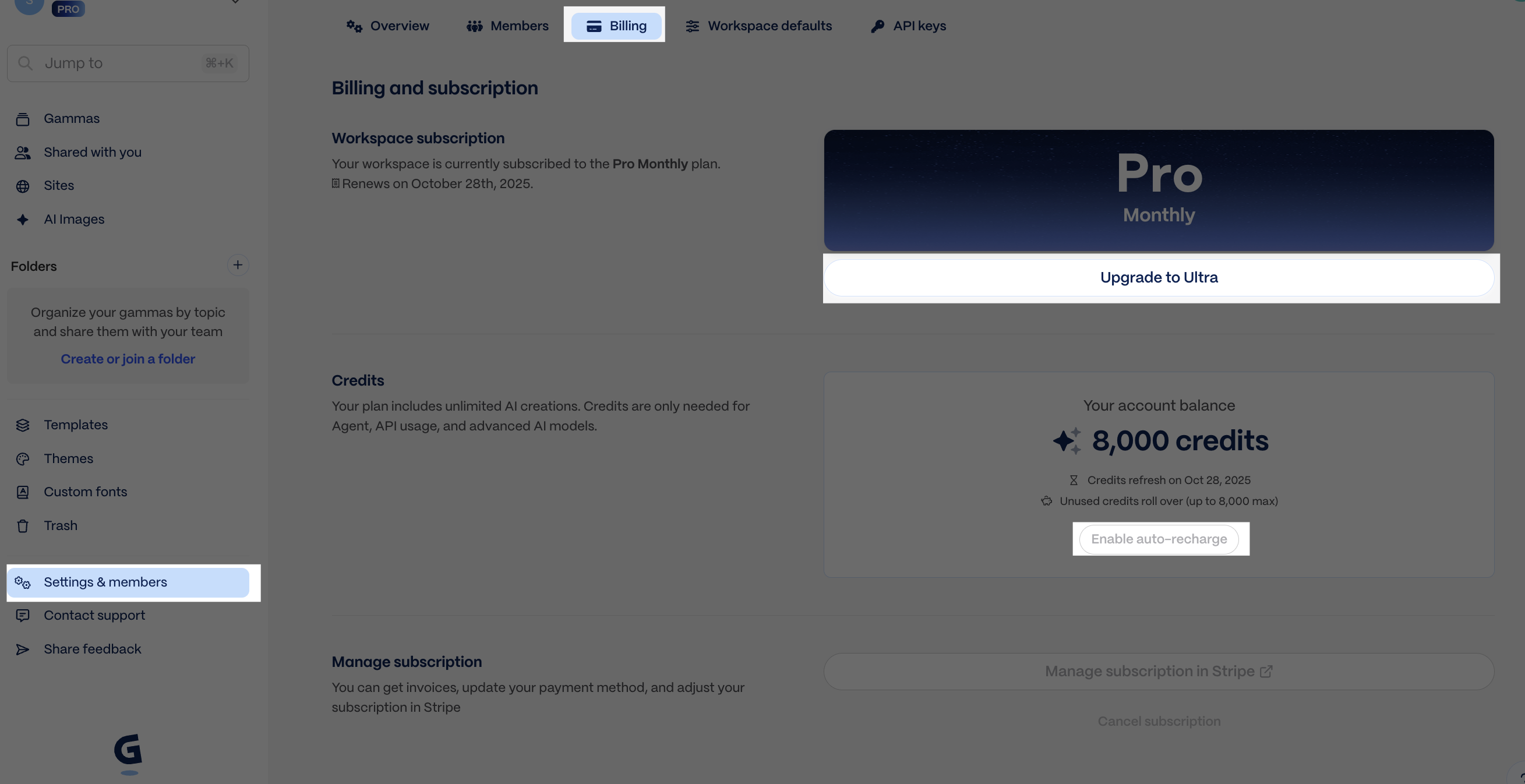
* If you run out of credits, you can upgrade to a higher subscription tier, purchase credits ad hoc, or enable auto-recharge (*recommended*) at [Settings > Billing](https://gamma.app/settings/billing).

<figure><img src="/files/zsWhmn1K4MAGN1iKmKGv" alt="Credit management in Gamma" width="75%"><figcaption><p>Settings > Billing</p></figcaption></figure>

### How credits work

Credit charges are determined based on several factors and are returned in the GET response.

| Feature         | API parameter        | Credits Charged\*                                                                                                       |
| --------------- | -------------------- | ----------------------------------------------------------------------------------------------------------------------- |
| Number of cards | `numCards`           | 1-3 credits/card (varies by the text generation model Gamma selects internally)                                         |
| AI image model  | `imageOptions.model` | Standard: 2-15 credits/image. Advanced: 20-33 credits/image. Premium: 34-75 credits/image. Ultra: 30-125 credits/image. |

\* **Credit consumption rates and the actions that consume credits are subject to change.**

Template-based generations (`POST /generations/from-template`) may cost slightly more per card than standard generations.

### Illustrative scenarios

* Deck with 10 cards + 5 images using a basic image model = \~20-60 credits
* Doc with 20 cards + 15 images using a premium image model = \~320-1070 credits
* Socials with 30 cards + 30 images using an ultra image model = \~930-3900 credits

Both standard generations (`POST /generations`) and template-based generations (`POST /generations/from-template`) consume credits. Credit usage details are returned in the `credits` field of the `GET /generations/{generationId}` response, showing `deducted` and `remaining` values.

To learn more about credits, visit our [Help Center](https://help.gamma.app/en/articles/7834324-how-do-ai-credits-work-in-gamma).

### Related

* [Connect integrations](/connectors/connectors-and-integrations) for setup instructions by platform
* [Poll for results](/guides/async-patterns-and-polling) for where `credits.deducted` and `credits.remaining` appear in the generation flow
* [Get Help](/reference/get-help) if you need support with pricing or API access


# POST /generations

Generate a presentation, document, website, or social post from text.

Start an asynchronous generation from text. Use this endpoint when Gamma should determine the layout from your input and generation settings.

## Create async generation

> Creates an asynchronous generation job from provided text input. Returns a generation ID that can be used to poll for status.

```json
{"openapi":"3.0.0","info":{"title":"Gamma Public API","version":"1.0"},"tags":[{"name":"public-api","description":"Public API endpoints for external integrations"}],"servers":[{"url":"https://public-api.gamma.app","description":"Production"}],"security":[{"api-key":[]}],"components":{"securitySchemes":{"api-key":{"type":"apiKey","in":"header","name":"X-API-KEY","description":"API key for authentication"}},"schemas":{"Generation":{"type":"object","properties":{"textMode":{"description":"How to interpret the input text","enum":["generate","condense","preserve"],"type":"string"},"format":{"description":"Output format for the generated Gamma","enum":["presentation","document","social","webpage"],"type":"string"},"cardSplit":{"description":"How to split content across cards","enum":["inputTextBreaks","auto"],"type":"string"},"exportAs":{"description":"Export format for automatic export after generation","enum":["pptx","pdf","png"],"type":"string"},"inputText":{"type":"string","description":"The text content to generate from (topic, outline, or full content)","minLength":1,"maxLength":400000},"title":{"type":"string","description":"Custom title for the generated Gamma. If not provided, a title will be automatically generated from the content.","minLength":1,"maxLength":500},"additionalInstructions":{"type":"string","description":"Additional instructions for the AI","minLength":0,"maxLength":5000},"numCards":{"type":"number","description":"Target number of cards/slides to generate","minimum":1},"themeId":{"type":"string","description":"Theme ID to apply (from /themes endpoint)"},"textOptions":{"description":"Text generation options","allOf":[{"$ref":"#/components/schemas/TextOptions"}]},"imageOptions":{"description":"Image generation and selection options","allOf":[{"$ref":"#/components/schemas/ImageOptions"}]},"cardOptions":{"description":"Card dimensions and layout options","allOf":[{"$ref":"#/components/schemas/CardOptions"}]},"sharingOptions":{"description":"Sharing and permissions options","allOf":[{"$ref":"#/components/schemas/SharingOptions"}]},"folderIds":{"description":"Folder IDs to place the generated Gamma in","maxItems":10,"type":"array","items":{"type":"string"}}},"required":["inputText"]},"TextOptions":{"type":"object","properties":{"amount":{"description":"Controls the amount of text generated per card","enum":["brief","medium","detailed","extensive"],"type":"string"},"language":{"description":"Language code for the generated content","enum":["en","en-gb","en-in","es","es-es","es-mx","es-419","ca","fr","zh-cn","zh-tw","ko","ja","ja-da","pt-br","pt-pt","de","it","ru","pl","uk","ro","hu","cs","el","tr","ar","ar-sa","he","fa","nl","sv","da","nb","fi","id","vi","hi","gu","mr","te","bn","ta","ur","kn","ml","th","sr","hr","sq","bg","sl","bs","mk","sw","ha","yo","tl","ms","kk","uz","af","lv","lt","et","is","cy"],"type":"string"},"tone":{"type":"string","description":"The tone or writing style for the generated text","minLength":0,"maxLength":500},"audience":{"type":"string","description":"The target audience for the content","minLength":0,"maxLength":500}}},"ImageOptions":{"type":"object","properties":{"model":{"description":"AI model to use for image generation","allOf":[{"$ref":"#/components/schemas/ImageModel"}]},"source":{"description":"Source for images: AI-generated or web search","enum":["webAllImages","webFreeToUse","webFreeToUseCommercially","aiGenerated","pictographic","giphy","pexels","placeholder","noImages","themeAccent"],"type":"string"},"style":{"type":"string","description":"Style description for AI-generated images","minLength":0,"maxLength":5000}}},"ImageModel":{"type":"string","enum":["dall-e-3","imagen-3-flash","imagen-3-pro","imagen-4-pro","imagen-4-ultra","ideogram-v3","ideogram-v3-turbo","ideogram-v3-quality","flux-1-pro","flux-1-quick","flux-1-ultra","flux-kontext-pro","flux-kontext-max","flux-kontext-fast","leonardo-phoenix","recraft-v3","recraft-v3-svg","recraft-v4","recraft-v4-svg","recraft-v4-pro","luma-photon-1","luma-photon-flash-1","gpt-image-1-medium","gpt-image-1-high","gpt-image-1-mini-low","gpt-image-1-mini-medium","gpt-image-1-mini-high","gpt-image-2-mini","gpt-image-2","gpt-image-2-hd","gemini-2.5-flash-image","veo-3.1-fast","veo-3.1","luma-ray-2-flash","luma-ray-2","leonardo-motion-2-fast","leonardo-motion-2","gemini-3-pro-image","gemini-3-pro-image-hd","gemini-3.1-flash-image-mini","gemini-3.1-flash-image","gemini-3.1-flash-image-hd","flux-2-pro","flux-2-flex","flux-2-max","flux-2-klein"],"description":"AI model to use for image generation"},"CardOptions":{"type":"object","properties":{"dimensions":{"description":"Card aspect ratio/dimensions","enum":["fluid","16x9","4x3","pageless","letter","a4","1x1","4x5","9x16"],"type":"string"},"headerFooter":{"description":"Header and footer configuration","allOf":[{"$ref":"#/components/schemas/HeaderFooter"}]}}},"HeaderFooter":{"type":"object","properties":{"topLeft":{"description":"Element in top-left position","allOf":[{"$ref":"#/components/schemas/HeaderFooterElement"}]},"topCenter":{"description":"Element in top-center position","allOf":[{"$ref":"#/components/schemas/HeaderFooterElement"}]},"topRight":{"description":"Element in top-right position","allOf":[{"$ref":"#/components/schemas/HeaderFooterElement"}]},"bottomLeft":{"description":"Element in bottom-left position","allOf":[{"$ref":"#/components/schemas/HeaderFooterElement"}]},"bottomCenter":{"description":"Element in bottom-center position","allOf":[{"$ref":"#/components/schemas/HeaderFooterElement"}]},"bottomRight":{"description":"Element in bottom-right position","allOf":[{"$ref":"#/components/schemas/HeaderFooterElement"}]},"hideFromFirstCard":{"type":"boolean","description":"Hide header/footer from the first card (title card)"},"hideFromLastCard":{"type":"boolean","description":"Hide header/footer from the last card"}}},"HeaderFooterElement":{"type":"object","properties":{"type":{"type":"string","description":"Type of element to display","enum":["text","image","cardNumber"]},"source":{"type":"string","description":"Image source type (required when type is \"image\")","enum":["custom","themeLogo"]},"src":{"type":"string","description":"Custom image URL (required when source is \"custom\")","format":"uri","minLength":1,"maxLength":2048},"value":{"type":"string","description":"Text content (required when type is \"text\")","minLength":1,"maxLength":500},"size":{"type":"string","description":"Size of the image element","enum":["sm","md","lg","xl"]}},"required":["type"]},"SharingOptions":{"type":"object","properties":{"workspaceAccess":{"description":"Default access level for workspace members","enum":["edit","comment","view","noAccess","fullAccess"],"type":"string"},"externalAccess":{"description":"Access level for external users (via shared link)","enum":["edit","comment","view","noAccess"],"type":"string"},"emailOptions":{"description":"Email sharing configuration","allOf":[{"$ref":"#/components/schemas/EmailOptions"}]}}},"EmailOptions":{"type":"object","properties":{"access":{"description":"Permission level for email recipients","enum":["edit","comment","view","fullAccess"],"type":"string"},"recipients":{"description":"Email addresses to share with","minItems":1,"type":"array","items":{"type":"string","format":"email"}}},"required":["recipients"]},"CreateGenerationResponse":{"type":"object","properties":{"generationId":{"type":"string","description":"Unique identifier for the generation job"},"warnings":{"type":"string","description":"Warnings about the request (e.g., ignored parameters)"}},"required":["generationId"]}}},"paths":{"/v1.0/generations":{"post":{"description":"Creates an asynchronous generation job from provided text input. Returns a generation ID that can be used to poll for status.","operationId":"createGeneration","parameters":[],"requestBody":{"required":true,"content":{"application/json":{"schema":{"$ref":"#/components/schemas/Generation"}}}},"responses":{"200":{"description":"Generation job created successfully","content":{"application/json":{"schema":{"$ref":"#/components/schemas/CreateGenerationResponse"}}}},"400":{"description":"Invalid request parameters"},"401":{"description":"Invalid or missing API key"},"402":{"description":"Insufficient credits"},"403":{"description":"Access denied or feature not available"}},"summary":"Create async generation","tags":["public-api"]}}}}
```

{% hint style="info" %}
For parameter guidance, see [Generate from text](/guides/generate-api-parameters-explained).
{% endhint %}

## Inspecting rate limit headers

Every response from the Gamma API includes rate limit headers (`x-ratelimit-remaining-burst`, `x-ratelimit-remaining`, `x-ratelimit-remaining-daily`). When testing with curl, add the `-i` flag to display these headers alongside the response body:

```bash
curl -i -X POST "https://public-api.gamma.app/v1.0/generations" \
  -H "X-API-KEY: your-api-key" \
  -H "Content-Type: application/json" \
  -d '{
    "inputText": "Create a presentation about renewable energy",
    "textMode": "generate"
  }'
```

Without `-i`, curl only shows the JSON body. In Python, JavaScript, or any HTTP client, these headers are accessible on the response object without any special flag.

See [Rate limit headers and adaptive polling](/guides/async-patterns-and-polling#rate-limit-headers-and-adaptive-polling) for how to use these headers to pace polling.

## Related

* [Generate from text](/guides/generate-api-parameters-explained) for parameter-by-parameter guidance
* [GET /generations/{id}](/generations/get-generation-status) for the polling step after creation
* [Async patterns and polling](/guides/async-patterns-and-polling) for the full polling workflow and rate limit guidance


# POST /generations/from-template

Adapt, remix, or transform an existing Gamma. The template's structure is preserved by default and changes only when your prompt asks.

Start an asynchronous generation by adapting an existing Gamma — swap content, retarget for a new audience, transform the subject, replace images, or restructure cards. The template's structure is preserved by default; it only changes when your prompt explicitly asks.

### When to use this endpoint

Use this instead of `POST /generations` when you have an existing Gamma whose layout, card count, or visual structure you want to keep. Provide the template's file ID as `gammaId` and describe what should change in `prompt`. Gamma preserves the template's structure by default — it only restructures cards when your prompt explicitly asks.

### Key differences from /generations

|           | /generations              | /generations/from-template                                    |
| --------- | ------------------------- | ------------------------------------------------------------- |
| Input     | `inputText` (raw content) | `prompt` (change instructions) + `gammaId` (template file ID) |
| Structure | Gamma decides layout      | Preserves template layout                                     |
| Use case  | Create from scratch       | Remix, retarget, or translate existing content                |

### What you get back

The response returns a `generationId` immediately. Poll `GET /generations/{id}` every 5 seconds until `status` is `completed` or `failed`. On completion, you receive `gammaUrl`, `exportUrl` (if `exportAs` was set), `gammaId`, and `credits` usage.

## Create generation from template

> Creates an asynchronous generation job from a template Gamma with variable substitution.

```json
{"openapi":"3.0.0","info":{"title":"Gamma Public API","version":"1.0"},"tags":[{"name":"public-api","description":"Public API endpoints for external integrations"}],"servers":[{"url":"https://public-api.gamma.app","description":"Production"}],"security":[{"api-key":[]}],"components":{"securitySchemes":{"api-key":{"type":"apiKey","in":"header","name":"X-API-KEY","description":"API key for authentication"}},"schemas":{"FromTemplateGeneration":{"type":"object","properties":{"exportAs":{"description":"Export format for automatic export after generation","enum":["pptx","pdf","png"],"type":"string"},"prompt":{"type":"string","description":"Text prompt describing what to generate","minLength":1,"maxLength":400000},"title":{"type":"string","description":"Custom title for the generated Gamma. If not provided, a title will be automatically generated from the content.","minLength":1,"maxLength":500},"gammaId":{"type":"string","description":"The File ID of the gamma to be used as a template. The File must contain exactly one Page."},"themeId":{"type":"string","description":"Theme ID to apply to the generated Gamma"},"imageOptions":{"description":"Image generation options","allOf":[{"$ref":"#/components/schemas/FromTemplateImageOptions"}]},"sharingOptions":{"description":"Sharing and permissions options","allOf":[{"$ref":"#/components/schemas/SharingOptions"}]},"folderIds":{"description":"Folder IDs to place the generated Gamma in","maxItems":10,"type":"array","items":{"type":"string"}}},"required":["prompt","gammaId"]},"FromTemplateImageOptions":{"type":"object","properties":{"model":{"description":"AI model for image generation","allOf":[{"$ref":"#/components/schemas/ImageModel"}]},"style":{"type":"string","description":"Style description for images","minLength":0,"maxLength":5000}}},"ImageModel":{"type":"string","enum":["dall-e-3","imagen-3-flash","imagen-3-pro","imagen-4-pro","imagen-4-ultra","ideogram-v3","ideogram-v3-turbo","ideogram-v3-quality","flux-1-pro","flux-1-quick","flux-1-ultra","flux-kontext-pro","flux-kontext-max","flux-kontext-fast","leonardo-phoenix","recraft-v3","recraft-v3-svg","recraft-v4","recraft-v4-svg","recraft-v4-pro","luma-photon-1","luma-photon-flash-1","gpt-image-1-medium","gpt-image-1-high","gpt-image-1-mini-low","gpt-image-1-mini-medium","gpt-image-1-mini-high","gpt-image-2-mini","gpt-image-2","gpt-image-2-hd","gemini-2.5-flash-image","veo-3.1-fast","veo-3.1","luma-ray-2-flash","luma-ray-2","leonardo-motion-2-fast","leonardo-motion-2","gemini-3-pro-image","gemini-3-pro-image-hd","gemini-3.1-flash-image-mini","gemini-3.1-flash-image","gemini-3.1-flash-image-hd","flux-2-pro","flux-2-flex","flux-2-max","flux-2-klein"],"description":"AI model to use for image generation"},"SharingOptions":{"type":"object","properties":{"workspaceAccess":{"description":"Default access level for workspace members","enum":["edit","comment","view","noAccess","fullAccess"],"type":"string"},"externalAccess":{"description":"Access level for external users (via shared link)","enum":["edit","comment","view","noAccess"],"type":"string"},"emailOptions":{"description":"Email sharing configuration","allOf":[{"$ref":"#/components/schemas/EmailOptions"}]}}},"EmailOptions":{"type":"object","properties":{"access":{"description":"Permission level for email recipients","enum":["edit","comment","view","fullAccess"],"type":"string"},"recipients":{"description":"Email addresses to share with","minItems":1,"type":"array","items":{"type":"string","format":"email"}}},"required":["recipients"]},"FromTemplateGenerationResponse":{"type":"object","properties":{"generationId":{"type":"string","description":"Unique identifier for the generation job"},"warnings":{"type":"string","description":"Warnings about the request"}},"required":["generationId"]}}},"paths":{"/v1.0/generations/from-template":{"post":{"description":"Creates an asynchronous generation job from a template Gamma with variable substitution.","operationId":"createFromTemplateGeneration","parameters":[],"requestBody":{"required":true,"content":{"application/json":{"schema":{"$ref":"#/components/schemas/FromTemplateGeneration"}}}},"responses":{"200":{"description":"Generation job created successfully","content":{"application/json":{"schema":{"$ref":"#/components/schemas/FromTemplateGenerationResponse"}}}},"400":{"description":"Invalid request or template not found"},"401":{"description":"Invalid or missing API key"},"402":{"description":"Insufficient credits"},"403":{"description":"Feature not enabled for workspace"}},"summary":"Create generation from template","tags":["public-api"]}}}}
```

{% hint style="info" %}
For template workflow guidance, see [Generate from template](/guides/create-from-template-api-parameters-explained).
{% endhint %}

## Related

* [Generate from template](/guides/create-from-template-api-parameters-explained) for workflow and parameter guidance
* [GET /generations/{id}](/generations/get-generation-status) for the polling step after creation


# GET /generations/{id}

Poll this endpoint until status is completed or failed.

Use this endpoint to poll an existing generation until `status` is `completed` or `failed`. This is where you receive `gammaUrl`, `exportUrl`, and `credits`.

### How polling works

After starting a generation with `POST /generations` or `POST /generations/from-template`, poll this endpoint every 5 seconds using the returned `generationId`. Most generations complete within 1-3 minutes.

### Generation states

| Status      | Meaning              | What to do                                        |
| ----------- | -------------------- | ------------------------------------------------- |
| `pending`   | Still generating     | Keep polling every 5 seconds                      |
| `completed` | Done                 | Stop polling — use the URLs and credit data below |
| `failed`    | Something went wrong | Stop polling — check the `error` object           |

### What you get back on completion

| Field               | Description                                                                                                                                                                                              |
| ------------------- | -------------------------------------------------------------------------------------------------------------------------------------------------------------------------------------------------------- |
| `gammaUrl`          | Link to view or share the generated Gamma                                                                                                                                                                |
| `exportUrl`         | Download URL for the exported file (if `exportAs` was set). Format matches `exportAs`: `pdf` and `pptx` download directly; `png` returns a `.zip` with one PNG per card. Signed, expires after \~1 week. |
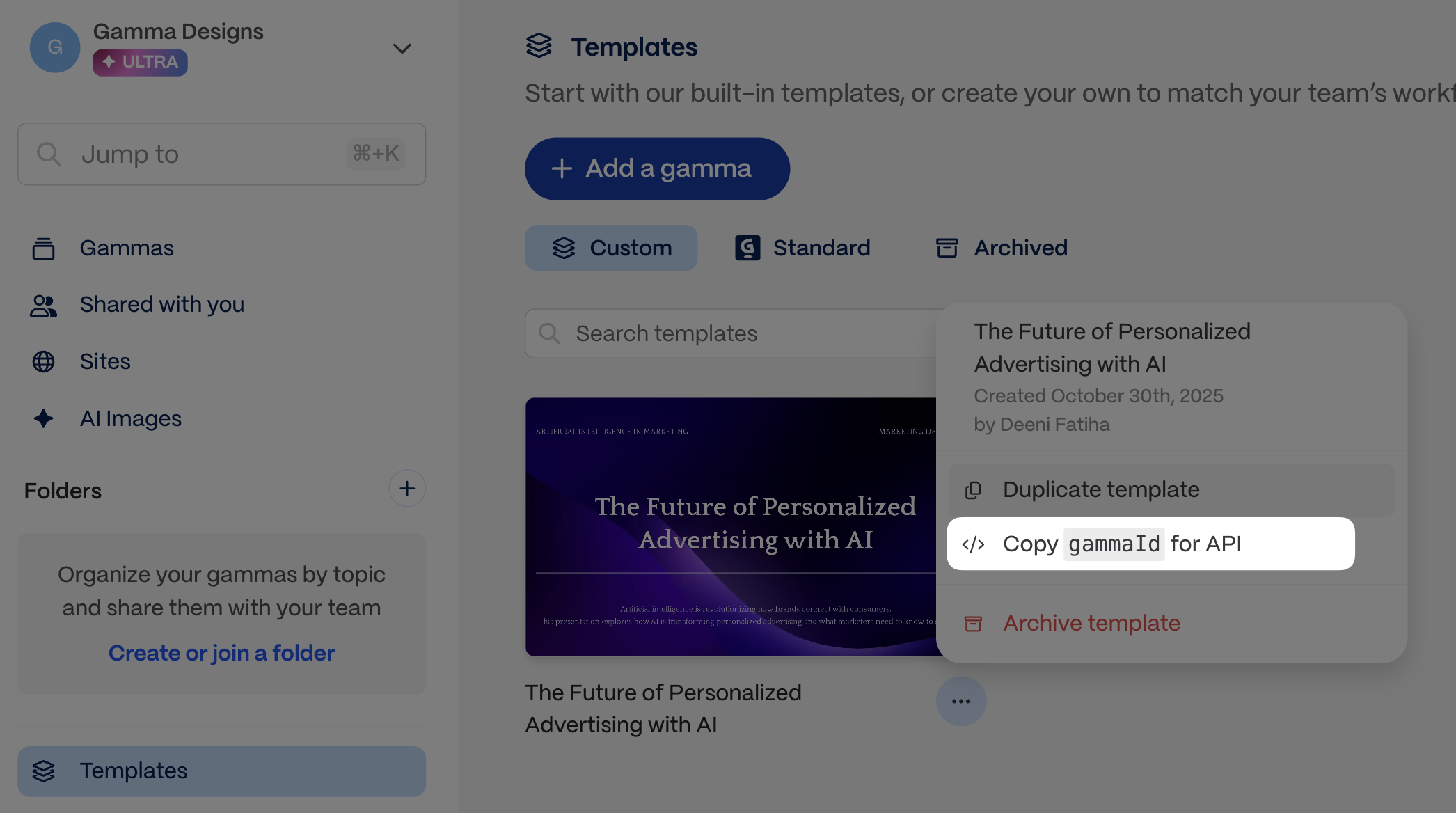
| `gammaId`           | The file ID (e.g. `g_l0mf2jvf1fpmi1v`). Use this for `POST /gammas/{gammaId}/archive` or `DELETE /gammas/{gammaId}`.                                                                                     |
| `credits.deducted`  | Credits consumed by this generation                                                                                                                                                                      |
| `credits.remaining` | Credits left in the workspace after this generation                                                                                                                                                      |

## Get generation status

> Retrieves the current status of a generation job. Poll this endpoint until status is "completed" or "failed".

```json
{"openapi":"3.0.0","info":{"title":"Gamma Public API","version":"1.0"},"tags":[{"name":"public-api","description":"Public API endpoints for external integrations"}],"servers":[{"url":"https://public-api.gamma.app","description":"Production"}],"security":[{"api-key":[]}],"components":{"securitySchemes":{"api-key":{"type":"apiKey","in":"header","name":"X-API-KEY","description":"API key for authentication"}},"schemas":{"GenerationStatusResponse":{"type":"object","properties":{"generationId":{"type":"string","description":"Unique identifier for the generation job"},"status":{"type":"string","description":"Current status of the generation job","enum":["failed","pending","completed"]},"gammaId":{"type":"string","description":"File ID of the generated Gamma (when completed)"},"gammaUrl":{"type":"string","description":"URL to the generated Gamma (when completed)"},"error":{"description":"Error details (when failed)","allOf":[{"$ref":"#/components/schemas/ErrorResponse"}]},"exportUrl":{"type":"string","description":"URL to download the exported file (when exportAs was specified).\nThe file format matches exportAs: `pptx` → .pptx, `pdf` → .pdf, `png` → a .zip archive containing one PNG per card (not a single PNG file).\nThe URL is signed and expires after approximately one week."},"credits":{"description":"Credit usage information","allOf":[{"$ref":"#/components/schemas/CreditsResponse"}]}},"required":["generationId","status"]},"ErrorResponse":{"type":"object","properties":{"message":{"type":"string","description":"Human-readable error message"},"statusCode":{"type":"number","description":"HTTP status code"}},"required":["message","statusCode"]},"CreditsResponse":{"type":"object","properties":{"deducted":{"type":"number","description":"Number of credits deducted for this operation"},"remaining":{"type":"number","description":"Remaining credits in the workspace"}},"required":["deducted","remaining"]}}},"paths":{"/v1.0/generations/{id}":{"get":{"description":"Retrieves the current status of a generation job. Poll this endpoint until status is \"completed\" or \"failed\".","operationId":"getGenerationStatus","parameters":[{"name":"id","required":true,"in":"path","description":"The unique generation ID returned from the create endpoint","schema":{"type":"string"}}],"responses":{"200":{"description":"Generation status retrieved successfully","content":{"application/json":{"schema":{"$ref":"#/components/schemas/GenerationStatusResponse"}}}},"400":{"description":"Invalid request parameters"},"401":{"description":"Invalid or missing API key"},"404":{"description":"Generation not found"}},"summary":"Get generation status","tags":["public-api"]}}}}
```

{% hint style="info" %}
For usage patterns, see [Poll for results](/guides/async-patterns-and-polling).
{% endhint %}

## Related

* [Poll for results](/guides/async-patterns-and-polling) for complete polling implementations
* [POST /generations](/generations/create-generation) if you need to start a new generation first


# GET /themes

List all themes available in your workspace, including custom themes.

List the themes available in the authenticated workspace. Use the returned `id` values as `themeId` in generation requests.

### What themes are

A theme controls the visual style of a generated Gamma — colors, fonts, backgrounds, and layout feel. Every workspace has access to Gamma's standard theme library plus any custom themes created in the workspace. Pass a theme's `id` as `themeId` in `POST /generations` or `POST /generations/from-template` to apply it.

### Pagination

Results are cursor-paginated. Each response includes `hasMore` (boolean) and `nextCursor` (string or null). To fetch the next page, pass the `nextCursor` value as the `after` query parameter. Use `limit` (1-50, default 20) to control page size. Use `query` to filter themes by name, or `type=standard|custom` to limit results to built-in or workspace themes. Keep the same `type` value across paginated requests.

## List themes

> Lists all themes available to the workspace, including standard themes and custom workspace themes.

```json
{"openapi":"3.0.0","info":{"title":"Gamma Public API","version":"1.0"},"tags":[{"name":"public-api","description":"Public API endpoints for external integrations"}],"servers":[{"url":"https://public-api.gamma.app","description":"Production"}],"security":[{"api-key":[]}],"components":{"securitySchemes":{"api-key":{"type":"apiKey","in":"header","name":"X-API-KEY","description":"API key for authentication"}},"schemas":{"ListThemesResponse":{"type":"object","properties":{"data":{"description":"Array of theme items","type":"array","items":{"$ref":"#/components/schemas/ThemeItem"}},"hasMore":{"type":"boolean","description":"Whether more results exist beyond this page"},"nextCursor":{"type":"string","nullable":true,"description":"Cursor for fetching the next page (null if no more results)"}},"required":["data","hasMore","nextCursor"]},"ThemeItem":{"type":"object","properties":{"id":{"type":"string","description":"Unique theme identifier"},"name":{"type":"string","description":"Display name of the theme"},"colorKeywords":{"description":"Keywords describing the theme's color palette","type":"array","items":{"type":"string"}},"toneKeywords":{"description":"Keywords describing the theme's tone/style","type":"array","items":{"type":"string"}},"type":{"type":"string","description":"Theme type: standard (built-in) or custom (workspace-created)","enum":["standard","custom"]}},"required":["id","name","type"]}}},"paths":{"/v1.0/themes":{"get":{"description":"Lists all themes available to the workspace, including standard themes and custom workspace themes.","operationId":"listThemes","parameters":[{"name":"query","required":false,"in":"query","description":"Search query to filter themes by name","schema":{"type":"string"}},{"name":"limit","required":false,"in":"query","description":"Maximum number of themes to return","schema":{"minimum":1,"maximum":50,"type":"number"}},{"name":"after","required":false,"in":"query","description":"Cursor for pagination (from previous response's nextCursor)","schema":{"type":"string"}},{"name":"type","required":false,"in":"query","description":"Filter by theme type: \"standard\" for built-in themes, \"custom\" for workspace-created themes. Must be kept consistent across paginated requests; changing it mid-pagination will yield inconsistent results.","schema":{"type":"string","enum":["standard","custom"]}}],"responses":{"200":{"description":"Themes retrieved successfully","content":{"application/json":{"schema":{"$ref":"#/components/schemas/ListThemesResponse"}}}},"400":{"description":"Invalid request parameters"},"401":{"description":"Invalid or missing API key"}},"summary":"List themes","tags":["public-api"]}}}}
```

{% hint style="info" %}
For guidance on when to fetch theme IDs and how to use them in requests, see [Use themes and folders](/guides/list-themes-and-list-folders-apis-explained).
{% endhint %}

## Related

* [Use themes and folders](/guides/list-themes-and-list-folders-apis-explained) for workflow guidance
* [POST /generations](/generations/create-generation) if you want to apply a returned `themeId`


# GET /folders

List all folders the authenticated user is a member of.

List the folders the authenticated user can access. Use the returned `id` values in `folderIds` when you want generated output stored in a specific folder.

### What folders are

Folders organize Gammas within a workspace. When you generate content via the API, it lands in the workspace root by default. Pass one or more folder `id` values as `folderIds` in `POST /generations` or `POST /generations/from-template` to file the generated Gamma into specific folders automatically.

### Pagination

Results are cursor-paginated. Each response includes `hasMore` (boolean) and `nextCursor` (string or null). To fetch the next page, pass the `nextCursor` value as the `after` query parameter. Use `limit` (1-50, default 20) to control page size. Use `query` to filter folders by name.

## List folders

> Lists all folders the authenticated user is a member of within the workspace.

```json
{"openapi":"3.0.0","info":{"title":"Gamma Public API","version":"1.0"},"tags":[{"name":"public-api","description":"Public API endpoints for external integrations"}],"servers":[{"url":"https://public-api.gamma.app","description":"Production"}],"security":[{"api-key":[]}],"components":{"securitySchemes":{"api-key":{"type":"apiKey","in":"header","name":"X-API-KEY","description":"API key for authentication"}},"schemas":{"ListFoldersResponse":{"type":"object","properties":{"data":{"description":"Array of folder items","type":"array","items":{"$ref":"#/components/schemas/FolderItem"}},"hasMore":{"type":"boolean","description":"Whether more results exist beyond this page"},"nextCursor":{"type":"string","nullable":true,"description":"Cursor for fetching the next page (null if no more results)"}},"required":["data","hasMore","nextCursor"]},"FolderItem":{"type":"object","properties":{"id":{"type":"string","description":"Unique folder identifier"},"name":{"type":"string","description":"Display name of the folder"}},"required":["id","name"]}}},"paths":{"/v1.0/folders":{"get":{"description":"Lists all folders the authenticated user is a member of within the workspace.","operationId":"listFolders","parameters":[{"name":"query","required":false,"in":"query","description":"Search query to filter folders by name","schema":{"type":"string"}},{"name":"limit","required":false,"in":"query","description":"Maximum number of folders to return","schema":{"minimum":1,"maximum":50,"type":"number"}},{"name":"after","required":false,"in":"query","description":"Cursor for pagination (from previous response's nextCursor)","schema":{"type":"string"}}],"responses":{"200":{"description":"Folders retrieved successfully","content":{"application/json":{"schema":{"$ref":"#/components/schemas/ListFoldersResponse"}}}},"400":{"description":"Invalid request parameters"},"401":{"description":"Invalid or missing API key"}},"summary":"List folders","tags":["public-api"]}}}}
```

{% hint style="info" %}
For guidance on when to fetch folder IDs and how to use them in requests, see [Use themes and folders](/guides/list-themes-and-list-folders-apis-explained).
{% endhint %}

## Related

* [Use themes and folders](/guides/list-themes-and-list-folders-apis-explained) for workflow guidance
* [POST /generations](/generations/create-generation) if you want to place output into one or more folders


# POST /gammas/{gammaId}/archive

Archive a Gamma document. Idempotent -- archiving an already archived Gamma succeeds.

Archive a Gamma to remove it from the active workspace without deleting it.

## Archive a Gamma

> Archives a Gamma document. The operation is idempotent - archiving an already archived Gamma succeeds.

```json
{"openapi":"3.0.0","info":{"title":"Gamma Public API","version":"1.0"},"tags":[{"name":"public-api","description":"Public API endpoints for external integrations"}],"servers":[{"url":"https://public-api.gamma.app","description":"Production"}],"security":[{"api-key":[]}],"components":{"securitySchemes":{"api-key":{"type":"apiKey","in":"header","name":"X-API-KEY","description":"API key for authentication"}},"schemas":{"ArchiveGammaResponse":{"type":"object","properties":{"gammaId":{"type":"string","description":"The ID of the archived Gamma"},"archived":{"type":"boolean","description":"Confirmation that the Gamma is archived"}},"required":["gammaId","archived"]}}},"paths":{"/v1.0/gammas/{gammaId}/archive":{"post":{"description":"Archives a Gamma document. The operation is idempotent - archiving an already archived Gamma succeeds.","operationId":"archiveGamma","parameters":[{"name":"gammaId","required":true,"in":"path","description":"The unique ID of the Gamma to archive","schema":{"type":"string"}}],"responses":{"200":{"description":"Gamma archived successfully","content":{"application/json":{"schema":{"$ref":"#/components/schemas/ArchiveGammaResponse"}}}},"400":{"description":"Invalid request parameters"},"401":{"description":"Invalid or missing API key"},"403":{"description":"Access denied - edit permission required"}},"summary":"Archive a Gamma","tags":["public-api"]}}}}
```

{% hint style="warning" %}
**The `gammaId` must be the file ID returned by the API** (e.g. `g_l0mf2jvf1fpmi1v`), not the slug from the web app URL. If you pass the URL slug (the ID at the end of `gamma.app/docs/My-Doc-bc7s74ruzod20f4`), the request returns `403` instead of `404`.
{% endhint %}

### Example

```bash
curl -X POST "https://public-api.gamma.app/v1.0/gammas/$GAMMA_ID/archive" \
  -H "X-API-KEY: $GAMMA_API_KEY"
```

```json
{
  "gammaId": "g_l0mf2jvf1fpmi1v",
  "archived": true
}
```

### Behavior

* **Idempotent.** Archiving an already archived Gamma returns `200` with `"archived": true`.
* **No credits deducted.** This endpoint does not consume credits.
* **Requires edit permission.** The API key owner must have edit access, and the Gamma must belong to the API key's workspace.

### Finding the gammaId

Poll a completed generation to get the ID:

```bash
curl "https://public-api.gamma.app/v1.0/generations/$GENERATION_ID" \
  -H "X-API-KEY: $GAMMA_API_KEY"
```

The `gammaId` value in the response (e.g. `g_l0mf2jvf1fpmi1v`) is what you pass to `/archive`. The `gammaUrl` field contains the web app link, but the slug in that URL is not the same ID.

### Related

* [GET /generations/{id}](/generations/get-generation-status) to retrieve the `gammaId` from a generation
* [Error codes](/reference/error-codes) for the `403` response when using a wrong ID


# DELETE /gammas/{gammaId}

Delete a Gamma document. Requires a workspace admin role on the API key's workspace.

Delete a Gamma document. Gamma archives it automatically first if needed, then marks it for deletion.

## Delete a Gamma

> Deletes a Gamma document. Requires workspace admin role on the workspace the API key belongs to. The Gamma is auto-archived first if not already archived, so a single call handles the full archive-then-delete transition. The Gamma becomes immediately inaccessible and is removed from all workspace views. After deletion, the Gamma is no longer addressable via the API; subsequent requests for the same ID return the same response as for a non-existent Gamma.

```json
{"openapi":"3.0.0","info":{"title":"Gamma Public API","version":"1.0"},"tags":[{"name":"public-api","description":"Public API endpoints for external integrations"}],"servers":[{"url":"https://public-api.gamma.app","description":"Production"}],"security":[{"api-key":[]}],"components":{"securitySchemes":{"api-key":{"type":"apiKey","in":"header","name":"X-API-KEY","description":"API key for authentication"}},"schemas":{"DeleteGammaResponse":{"type":"object","properties":{"status":{"type":"string","description":"Status of the deletion request. Always `deleted` on success.","enum":["deleted"]},"gammaId":{"type":"string","description":"The ID of the deleted Gamma"},"message":{"type":"string","description":"Customer-facing message confirming the Gamma has been deleted."}},"required":["status","gammaId","message"]}}},"paths":{"/v1.0/gammas/{gammaId}":{"delete":{"description":"Deletes a Gamma document. Requires workspace admin role on the workspace the API key belongs to. The Gamma is auto-archived first if not already archived, so a single call handles the full archive-then-delete transition. The Gamma becomes immediately inaccessible and is removed from all workspace views. After deletion, the Gamma is no longer addressable via the API; subsequent requests for the same ID return the same response as for a non-existent Gamma.","operationId":"deleteGamma","parameters":[{"name":"gammaId","required":true,"in":"path","description":"The unique ID of the Gamma to delete","schema":{"type":"string"}}],"responses":{"200":{"description":"Gamma deleted successfully","content":{"application/json":{"schema":{"$ref":"#/components/schemas/DeleteGammaResponse"}}}},"400":{"description":"Invalid request parameters"},"401":{"description":"Invalid or missing API key"},"403":{"description":"Access denied - workspace admin role required"}},"summary":"Delete a Gamma","tags":["public-api"]}}}}
```

{% hint style="warning" %}
Deletion requires a workspace admin role on the API key's workspace. A successful response returns `status: deleted`. The Gamma becomes immediately inaccessible and is no longer addressable via the API.
{% endhint %}

## Related

* [GET /generations/{id}](/generations/get-generation-status) to retrieve the `gammaId` from a completed generation
* [POST /gammas/{gammaId}/archive](/management/archive-gamma) if you want to archive without deleting
* [Error codes](/reference/error-codes) for authentication and permission failures


# Generate from text

When to use the Generate endpoint and how to choose the parameters that shape the output.

`POST /v1.0/generations` accepts many optional fields; the sections below describe how each one shapes the output.

{% hint style="info" %}
For the exact request body, field types, and response schema, see [POST /generations](/generations/create-generation) and [GET /generations/{id}](/generations/get-generation-status).
{% endhint %}

### Quick reference

* `inputText` is always required.
* `title` lets you set the Gamma title directly instead of relying on inference from the generated content.
* `textMode` controls whether Gamma expands, condenses, or preserves your source text.
* `format`, `themeId`, `imageOptions`, and `cardOptions` shape the look and output type.
* Poll `GET /v1.0/generations/{generationId}` to retrieve `gammaUrl`, `exportUrl`, and credit usage after creation.

### Top-level parameters

#### `title` *(optional)*

Sets the title of the generated Gamma at creation time.

* Use this when you want a stable, explicit name instead of relying on inferred titles.
* Character limits: 1-500.
* If omitted, Gamma infers the title from the generated content.

{% code title="Example" %}

```json
"title": "Q3 Board Update"
```

{% endcode %}

***

#### `inputText` *(required)*

Content used to generate your gamma, including text and image URLs.

**Add images to the input**

You can provide URLs for specific images you want to include. Simply insert the URLs into your content where you want each image to appear (see example below). You can also add instructions for how to display the images in `additionalInstructions`, eg, "Group the last 10 images into a gallery to showcase them together."

{% hint style="info" %}
**Note:** If you want your gamma to use *only* the images you provide (and not generate additional ones), set `imageOptions.source` to `noImages`.
{% endhint %}

**Token limits**

The token limit is 100,000, which is approximately 400,000 characters. However, in some cases, the token limit may be lower, especially if your use case requires extra reasoning from our AI models. We highly recommend keeping inputText below 100,000 tokens and testing out a variety of inputs to get a good sense of what works for your use case.

**Other tips**

* Text can be as little as a few words that describe the topic of the content you want to generate.
* You can also input longer text -- pages of messy notes or highly structured, detailed text.
* You can control where cards are split by adding \n---\n to the text.
* You may need to apply JSON escaping to your text. Find out more about JSON escaping and [try it out here](https://www.devtoolsdaily.com/json/escape/).

{% code title="Example" %}

```json
"inputText": "Ways to use AI for productivity"
```

{% endcode %}

{% code title="Example" %}

```json
"inputText": "# The Final Frontier: Deep Sea Exploration\n* Less than 20% of our oceans have been explored\n* Deeper than 1,000 meters remains largely mysterious\n* More people have been to space than to the deepest parts of our ocean\n\nhttps://img.genially.com/5b34eda40057f90f3a45b977/1b02d693-2456-4379-a56d-4bc5e14c6ae1.jpeg\n---\n# Technological Breakthroughs\n* Advanced submersibles capable of withstanding extreme pressure\n* ROVs (Remotely Operated Vehicles) with HD cameras and sampling tools\n* Autonomous underwater vehicles for extended mapping missions\n* Deep-sea communication networks enabling real-time data transmission\n\nhttps://images.encounteredu.com/excited-hare/production/uploads/subject-update-about-exploring-the-deep-hero.jpg?w=1200&h=630&q=82&auto=format&fit=crop&dm=1631569543&s=48f275c76c565fdaa5d4bd365246afd3\n---\n# Ecological Discoveries\n* Unique ecosystems thriving without sunlight\n* Hydrothermal vent communities using chemosynthesis\n* Creatures with remarkable adaptations: bioluminescence, pressure resistance\n* Thousands of new species discovered annually\n---\n# Scientific & Economic Value\n* Understanding climate regulation and carbon sequestration\n* Pharmaceutical potential from deep-sea organisms\n* Mineral resources and rare earth elements\n* Insights into extreme life that could exist on other planets\n\nhttps://publicinterestnetwork.org/wp-content/uploads/2023/11/Western-Pacific-Jarvis_PD_NOAA-OER.jpg\n---\n# Future Horizons\n* Expansion of deep-sea protected areas\n* Sustainable exploration balancing discovery and conservation\n* Technological miniaturization enabling broader coverage\n* Citizen science initiatives through shared deep-sea data"
```

{% endcode %}

***

#### `textMode` *(optional)*

Determines how your `inputText` is modified, if at all.

* You can choose between `generate`, `condense`, or `preserve`
* `generate`: Using your `inputText` as a starting point, Gamma will rewrite and expand the content. Works best when you have brief text in the input that you want to elaborate on.
* `condense`: Gamma will summarize your `inputText` to fit the content length you want. Works best when you start with a large amount of text that you'd like to summarize.
* `preserve`: Gamma will retain the exact text in `inputText`, sometimes structuring it where it makes sense to do so, eg, adding headings to sections. (If you do not want any modifications at all, you can specify this in the `additionalInstructions` parameter.)

{% code title="Example" %}

```json
"textMode": "generate"
```

{% endcode %}

***

#### `format` *(optional, defaults to`presentation`)*

Determines the artifact Gamma will create for you.

* You can choose between `presentation`, `document`, `social`, or `webpage`.
* You can use the `cardOptions.dimensions`field to further specify the shape of your output.

{% code title="Example" %}

```json
"format": "presentation"
```

{% endcode %}

***

#### `themeId` *(optional, defaults to workspace default theme)*

Defines which theme from Gamma will be used for the output. Themes determine the look and feel of the gamma, including colors and fonts.

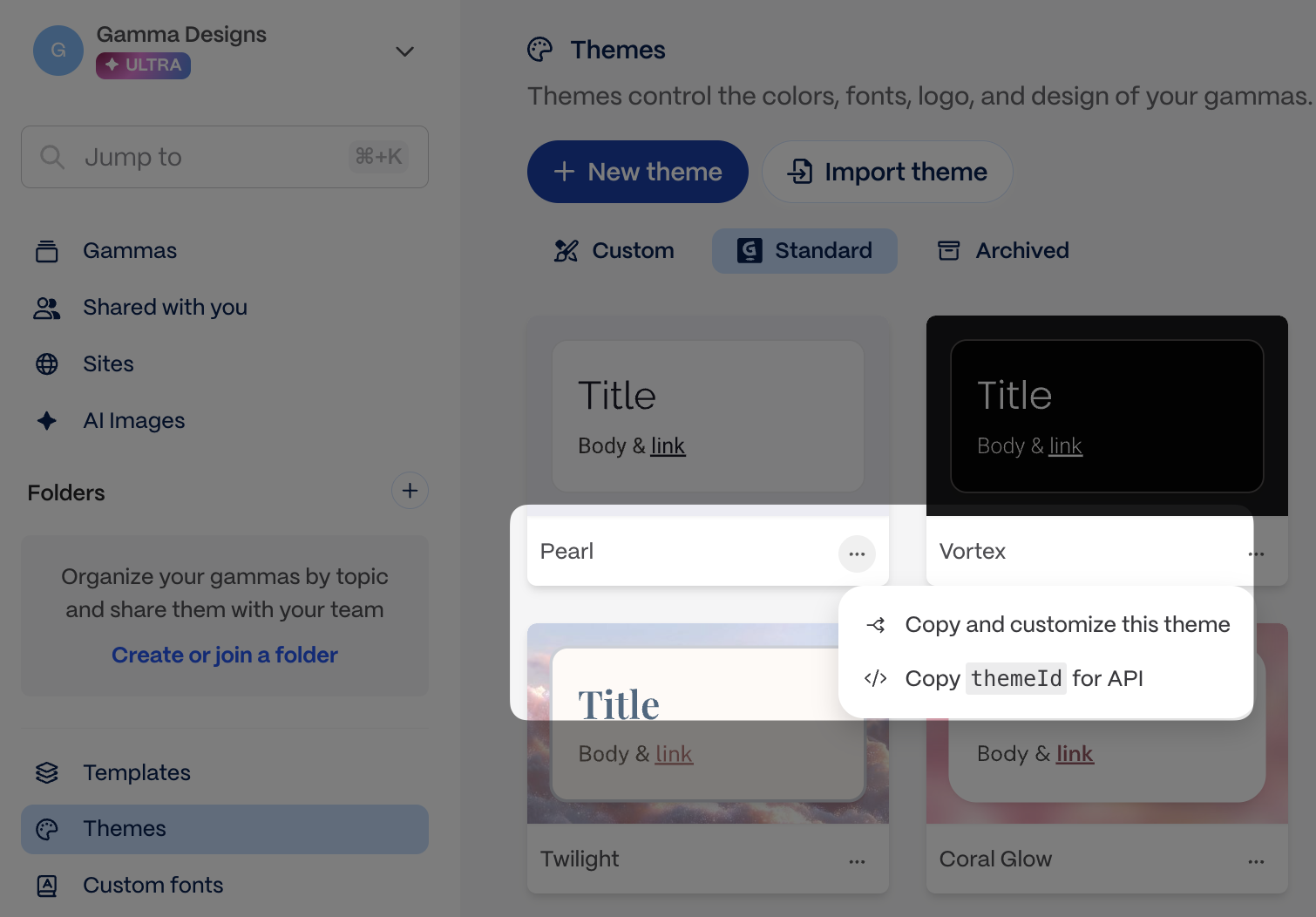
* Use [`GET /v1.0/themes`](/workspace/list-themes) to list themes from your workspace, or copy the theme ID directly from the app.

<figure><img src="/files/la1Uiber1162TVQCcrmL" alt="Theme ID location in Gamma" width="75%"><figcaption><p>Copy the theme ID from the app</p></figcaption></figure>

{% code title="Example" %}

```json
"themeId": "abc123def456ghi"
```

{% endcode %}

***

#### `numCards` *(optional, defaults to`10`)*

Determines how many cards are created if `auto` is chosen in `cardSplit`

* Pro, Teams, and Business plans: 1 to 60 cards.
* Ultra plan: 1 to 75 cards.

{% code title="" %}

```json
"numCards": 10
```

{% endcode %}

***

#### `cardSplit` *(optional, defaults to`auto`)*

Determines how your content will be divided into cards.

* You can choose between `auto` or `inputTextBreaks`
* Choosing `auto` tells Gamma to looks at the `numCards` field and divide up content accordingly. (It will not adhere to text breaks \n---\n in your `inputText`.)
* Choosing `inputTextBreaks` tells Gamma that it should look for text breaks \n---\n in your `inputText` and divide the content based on this. (It will not respect `numCards`.)
  * Note: One \n---\n = one break, ie, text with one break will produce two cards, two break will produce three cards, and so on.

| inputText contains \n---\n and how many | cardSplit       | numCards   | output has         |
| --------------------------------------- | --------------- | ---------- | ------------------ |
| No                                      | auto            | 9          | 9 cards            |
| No                                      | auto            | left blank | 10 cards (default) |
| No                                      | inputTextBreaks | 9          | 1 card             |
| Yes, 5                                  | auto            | 9          | 9 cards            |
| Yes, 5                                  | inputTextBreaks | 9          | 6 cards            |

```json
"cardSplit": "auto"
```

***

#### `additionalInstructions` *(optional)*

Helps you add more specifications about your desired output.

* You can add specifications to steer content, layouts, and other aspects of the output.
* Works best when the instructions do not conflict with other parameters, eg, if the `textMode` is defined as `condense`, and the `additionalInstructions` say to preserve all text, the output will not be able to respect these conflicting requests.
* Character limits: 1-5000.

```json
"additionalInstructions": "Make the card headings humorous and catchy"
```

{% hint style="success" %}
**Pro tip: Use `additionalInstructions` for aesthetic feedback**

This field is especially powerful for specific visual and stylistic guidance that doesn't fit elsewhere:

* **Layout preferences**: "Use a gallery layout for the product images", "Keep text on the left side of cards"
* **Visual style**: "Make it feel modern and minimalist", "Use bold colors and dynamic compositions"
* **Tone adjustments**: "Make headlines punchy and attention-grabbing", "Keep the overall vibe professional but approachable"
* **Specific formatting**: "Use bullet points instead of paragraphs", "Include a summary card at the end"

The more specific you are, the better the results!
{% endhint %}

***

#### `folderIds` *(optional)*

Defines which folder(s) your gamma is stored in.

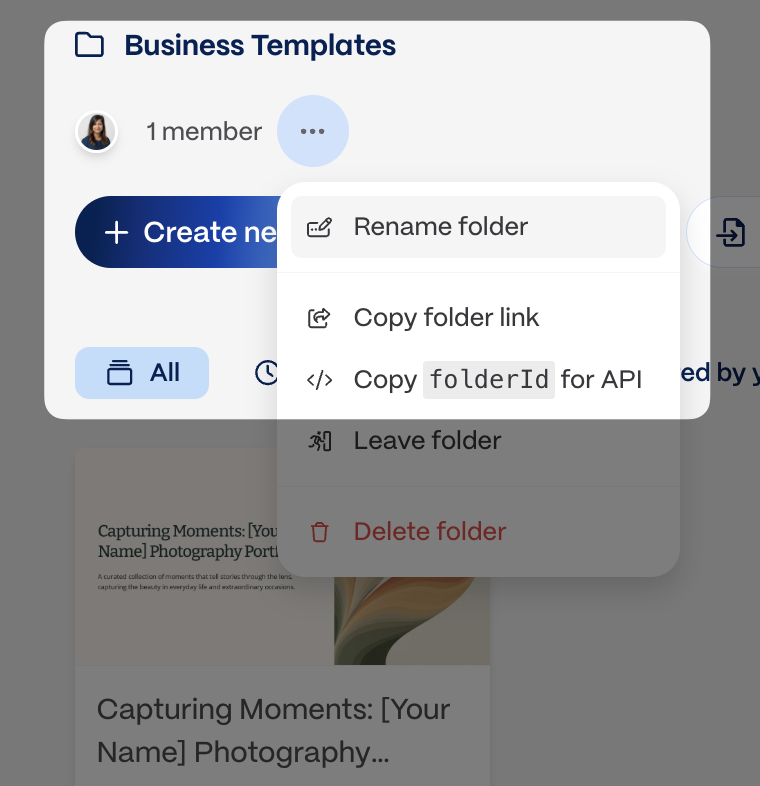
* Use [`GET /v1.0/folders`](/workspace/list-folders) to list folders, or copy the folder ID directly from the app.
* You must be a member of a folder to add gammas to it.

<figure><img src="/files/GRB2kYBmuwdIPyq56wrK" alt="Folder ID location in Gamma" width="75%"><figcaption><p>Copy the folder ID from the app</p></figcaption></figure>

```json
"folderIds": ["123abc456def", "456123abcdef"]
```

***

#### `exportAs` *(optional)*

Indicates if you'd like to return the generated gamma as an exported file as well as a Gamma URL.

* Options are `pdf`, `pptx`, or `png`
* `png` returns a `.zip` with one PNG per card, not a single image file.
* Export URLs are signed and expire after approximately one week. Download promptly after generation completes.
* If you do not wish to directly export via the API, you may always do so later via the app.

{% hint style="warning" %}
**One export format per request.** You can export to PDF, PPTX, or PNG, but not multiple formats in a single API call. If you need multiple formats, make separate generation requests or export additional formats manually from the Gamma app.
{% endhint %}

{% code title="Example" %}

```json
"exportAs": "pdf"
```

{% endcode %}

***

#### textOptions

**`textOptions.amount`** *(optional, defaults to `medium`)*

Influences how much text each card contains. Relevant only if `textMode` is set to `generate` or `condense`.

* You can choose between `brief`, `medium`, `detailed` or `extensive`

{% code title="Example" %}

```json
"textOptions": {
    "amount": "detailed"
  }
```

{% endcode %}

**`textOptions.tone`** *(optional)*

Defines the mood or voice of the output. Relevant only if `textMode` is set to `generate`.

* You can add one or multiple words to hone in on the mood/voice to convey.
* Character limits: 1-500.

{% code title="Example" %}

```json
"textOptions": {
    "tone": "neutral"
  }
```

{% endcode %}

{% code title="Example" %}

```json
"textOptions": {
    "tone": "professional, upbeat, inspiring"
  }
```

{% endcode %}

**`textOptions.audience`** *(optional)*

Describes who will be reading/viewing the gamma, which allows Gamma to cater the output to the intended group. Relevant only if `textMode` is set to `generate`.

* You can add one or multiple words to hone in on the intended viewers/readers of the gamma.
* Character limits: 1-500.

{% code title="Example" %}

```json
"textOptions": {
    "audience": "outdoors enthusiasts, adventure seekers"
  }
```

{% endcode %}

{% code title="Example" %}

```json
"textOptions": {
    "audience": "seven year olds"
  }
```

{% endcode %}

**`textOptions.language`** *(optional, defaults to `en`)*

Determines the language in which your gamma is generated, regardless of the language of the `inputText`.

* You can choose from the languages listed in [Output language accepted values](/reference/output-language-accepted-values).

{% code title="Example" %}

```json
"textOptions": {
    "language": "en"
  }
```

{% endcode %}

***

#### imageOptions

**`imageOptions.source`** *(optional, defaults to `aiGenerated`)*

Determines where the images for the gamma are sourced from. You can choose from the options below. If you are providing your own image URLs in `inputText` and want only those to be used, set `imageOptions.source` to `noImages` to indicate that Gamma should not generate additional images.

| Options for `source`       | Notes                                                                                                                                                                                 |
| -------------------------- | ------------------------------------------------------------------------------------------------------------------------------------------------------------------------------------- |
| `aiGenerated`              | If you choose this option, you can also specify the `imageOptions.model` you want to use as well as an `imageOptions.style`. These parameters do not apply to other `source` options. |
| `pictographic`             | Pulls images from Pictographic.                                                                                                                                                       |
| `pexels`                   | Gets images from Pexels.                                                                                                                                                              |
| `giphy`                    | Gets GIFs from Giphy.                                                                                                                                                                 |
| `webAllImages`             | Pulls the most relevant images from the web, even if licensing is unknown.                                                                                                            |
| `webFreeToUse`             | Pulls images licensed for personal use.                                                                                                                                               |
| `webFreeToUseCommercially` | Gets images licensed for commercial use, like a sales pitch.                                                                                                                          |
| `themeAccent`              | Uses accent images from your selected theme.                                                                                                                                          |
| `placeholder`              | Creates a gamma with placeholders for which images can be manually added later.                                                                                                       |
| `noImages`                 | Creates a gamma with no images. Select this option if you are providing your own image URLs in `inputText` and want only those in your gamma.                                         |

{% code title="Example" %}

```json
"imageOptions": {
    "source": "aiGenerated"
  }
```

{% endcode %}

**`imageOptions.model`** *(optional)*

This field is relevant if the `imageOptions.source` chosen is `aiGenerated`. The `imageOptions.model` parameter determines which model is used to generate images.

* You can choose from the models listed in [Image model accepted values](/reference/image-model-accepted-values).
* If no value is specified for this parameter, Gamma automatically selects a model for you.

{% code title="Example" %}

```json
"imageOptions": {
	"model": "flux-1-pro"
  }
```

{% endcode %}

**`imageOptions.style`** *(optional)*

This field is relevant if the `imageOptions.source` chosen is `aiGenerated`. The `imageOptions.style` parameter influences the artistic style of the images generated. While this is an optional field, we highly recommend adding some direction here to create images in a cohesive style.

* You can add one or multiple words to define the visual style of the images you want.
* Adding some direction -- even a simple one word like "photorealistic" -- can create visual consistency among the generated images.
* Character limits: 1-5000.

{% code title="Example" %}

```json
"imageOptions": {
	"style": "minimal, black and white, line art"
  }
```

{% endcode %}

**What about accent images?**

{% hint style="info" %}
**Accent images are automatically placed by Gamma** - they cannot be directly controlled via the API.

Accent images are large, decorative images that enhance the visual appeal of cards. Gamma's AI automatically determines:

* **Whether** to include an accent image on each card
* **Where** to place it (left, right, top, or background)
* **What** image to use (based on your content and `imageOptions` settings)

The placement works best with fixed-dimension formats like `16x9` presentations. If you need more control over images, consider providing specific image URLs directly in your `inputText`.
{% endhint %}

**Providing your own image URLs**

When including image URLs in your `inputText`, follow these best practices to avoid broken images:

{% hint style="warning" %}
**Use long-lived or permanent URLs**

Gamma stores references to your image URLs. If the URL expires or becomes inaccessible, the image will appear broken in your presentation.

**For S3/Cloud Storage signed URLs:**

* Set expiration to **at least 7 days** (longer is better)
* Consider using permanent public URLs or CDN links instead
* Test that URLs are accessible before submitting

**Avoid:**

* Short-lived signed URLs (< 24 hours)
* URLs that require authentication headers
* Localhost or internal network URLs
  {% endhint %}

| URL Type                            | Recommended | Notes                              |
| ----------------------------------- | ----------- | ---------------------------------- |
| Public CDN (Cloudflare, CloudFront) | ✅ Yes       | Permanent, fast, reliable          |
| S3 signed URL (7+ days)             | ✅ Yes       | Works if expiration is long enough |
| S3 signed URL (< 24 hours)          | ❌ No        | Will break after expiration        |
| Google Drive/Dropbox share links    | ⚠️ Maybe    | Can break if permissions change    |
| Imgur, hosted image services        | ✅ Yes       | Generally permanent                |
| Localhost / 192.168.x.x             | ❌ No        | Not accessible to Gamma servers    |

{% hint style="success" %}
**Testing your URLs**: Before submitting a generation request, open each image URL in an incognito browser window. If you can see the image without logging in, Gamma can access it too.
{% endhint %}

***

#### cardOptions

**`cardOptions.dimensions`** *(optional)*

Determines the aspect ratio of the cards to be generated. Fluid cards expand with your content. Not applicable if `format` is `webpage`.

* Options if `format` is `presentation`: `fluid` **(default)**, `16x9`, `4x3`
* Options if `format` is `document`: `fluid` **(default)**, `pageless`, `letter`, `a4`
* Options if `format` is `social`: `1x1`, `4x5`**(default)** (good for Instagram posts and LinkedIn carousels), `9x16` (good for Instagram and TikTok stories)

{% hint style="warning" %}
**Only the values listed above are accepted** — custom ratios or pixel dimensions are not supported. The `dimensions` value must also be valid for the chosen `format`. If they don't match, the API applies a default for that format and includes a warning in the response.
{% endhint %}

{% code title="Example" %}

```json
"cardOptions": {
  "dimensions": "16x9"
}
```

{% endcode %}

**`cardOptions.headerFooter`** *(optional)*

Allows you to specify elements in the header and footer of the cards. Not applicable if `format` is `webpage`.

* Step 1: Pick which positions you want to populate. Options: `topLeft`, `topRight`, `topCenter`, `bottomLeft`, `bottomRight`, `bottomCenter`.
* Step 2: For each position, specify what type of content goes there. Options: `text`, `image`, and `cardNumber`.
* Step 3: Configure based on type.
  * For `text`, define a `value` (required)
  * For `image`:
    * Set the `source`. Options: `themeLogo` or `custom`image (required)
    * Set the `size` . Options:`sm`, `md`, `lg`, `xl` (optional)
    * For a`custom` image, define a `src` image URL (required)
  * For `cardNumber`, no additional configuration is available.
* Step 4: For any position, you can control whether it appears on the first or last card:
  * `hideFromFirstCard` (optional) - Set to `true` to hide from first card. Default: `false`
  * `hideFromLastCard` (optional) - Set to `true` to hide from last card. Default: `false`

{% code title="Example" %}

```json
"cardOptions": {
    "headerFooter": {
      "topRight": {
        "type": "image",
        "source": "themeLogo",
        "size": "sm"
      },
      "bottomRight": {
        "type": "cardNumber"
      },
      "hideFromFirstCard": true
    }
}
```

{% endcode %}

{% code title="Example" %}

```json
"cardOptions": {
    "headerFooter": {
      "topRight": {
        "type": "image",
        "source": "custom",
        "src": "https://example.com/logo.png",
        "size": "md"
      },
      "bottomRight": {
        "type": "text",
        "value": "© 2026 Company™"
      },
      "hideFromFirstCard": true,
      "hideFromLastCard": true
    }
}
```

{% endcode %}

***

#### sharingOptions

**`sharingOptions.workspaceAccess`** *(optional, defaults to workspace setting)*

Determines level of access members in your workspace will have to your generated gamma.

* Options are: `noAccess`, `view`, `comment`, `edit`, `fullAccess`
* `fullAccess` allows members from your workspace to view, comment, edit, and share with others.

When omitted, Gamma applies the workspace default. Admins set it at [Settings > Sharing](https://gamma.app/settings/sharing) under "Default workspace sharing permission for new gammas." Setting the default to "No access" makes every new gamma private without needing to pass `noAccess` on every API call. Explicit values in the API request always override the workspace default.

```json
"sharingOptions": {
	"workspaceAccess": "comment"
}
```

**`sharingOptions.externalAccess`** *(optional, defaults to workspace setting)*

Determines level of access members **outside your workspace** will have to your generated gamma.

* Options are: `noAccess`, `view`, `comment`, or `edit`

When omitted, Gamma applies the workspace default. Admins set it at [Settings > Sharing](https://gamma.app/settings/sharing) under "Default link sharing permission for new gammas." Setting the default to "No access" disables link sharing by default. Explicit values in the API request always override the workspace default.

{% code title="Example" %}

```json
"sharingOptions": {
	"externalAccess": "noAccess"
}
```

{% endcode %}

**`sharingOptions.emailOptions`** *(optional)*

Allows you to share your gamma with specific recipients via their email address.

{% code title="Example" %}

```json
"sharingOptions": {
  "emailOptions": {
    "recipients": ["ceo@example.com", "cto@example.com"]
  }
}
```

{% endcode %}

**`sharingOptions.emailOptions.access`** *(optional)*

Determines level of access those specified in `sharingOptions.emailOptions.recipients` have to your generated gamma. Only workspace members can have `fullAccess`

* Options are: `view`, `comment`, `edit`, or `fullAccess`

{% code title="Example" %}

```json
"sharingOptions": {
  "emailOptions": {
    "access": "comment"
  }
}
```

{% endcode %}

### Related

* [Generate from a template](/guides/create-from-template-api-parameters-explained) if you want to preserve an existing layout
* [Poll for results](/guides/async-patterns-and-polling) for the post-request workflow
* [Header and Footer Formatting](/guides/header-and-footer-formatting) for deeper guidance on `cardOptions.headerFooter`


# Generate from template

When to use the Create from Template endpoint and how to choose the parameters that control the generated output.

`POST /v1.0/generations/from-template` adapts, remixes, or transforms an existing Gamma. The template's structure is preserved by default and changes only when your prompt asks. The sections below explain how each parameter shapes the output.

{% hint style="info" %}
For the exact request body, field types, and polling response schema, see [POST /generations/from-template](/generations/create-from-template) and [GET /generations/{id}](/generations/get-generation-status).
{% endhint %}

### Quick reference

* `gammaId` and `prompt` are required.
* `title` lets you set the generated Gamma title directly instead of relying on the template name or inferred content.
* The template Gamma must contain exactly one page.
* Use `themeId`, `folderIds`, `exportAs`, and `sharingOptions` the same way you would in the standard generation flow.
* Poll `GET /v1.0/generations/{generationId}` to retrieve `gammaUrl`, `exportUrl`, and credit usage.

### What you can ask for

The `prompt` parameter is the same instruction surface as the Remix feature in the Gamma app, and it supports a broader set of operations than "fill in the blanks". You can adapt content for a new audience, transform the subject, add or remove cards, lock specific cards, and more.

| Category                          | Example prompt                                                                                                               |
| --------------------------------- | ---------------------------------------------------------------------------------------------------------------------------- |
| Tailoring to an audience          | `Adapt this pitch deck for a healthcare audience, highlighting regulatory compliance, patient safety, and clinical outcomes` |
| Replacing or transforming content | `Using this lesson plan about climate change, create a new one about clean energy`                                           |
| Variables & placeholders          | `Replace all instances of [[client-name]] with Acme Corp and update the contact information`                                 |
| Referencing cards                 | `On card 9, update the pricing information with the new rates`                                                               |
| Adding cards                      | `After the introduction, create three case study cards using the template and content below`                                 |
| Removing cards                    | `Remove the team bios section and the duplicate intro slide at the start`                                                    |
| "Locking" cards                   | `Do not edit the title card, team bios, or thank you slide — they should stay exactly as written`                            |
| Images                            | `Use this logo to replace the placeholder image on the title slide` (include image URLs in your prompt)                      |
| Populating from data              | `Fill out the client overview card using their responses from this intake form`                                              |
| Reordering cards                  | `Reorder the sections so that "Our Solution" comes before "The Problem" and move the case studies to the end`                |

Combine these patterns in a single prompt, or describe the outcome you want and let Gamma figure out the operations. Placeholder tokens like `[[client-name]]` are a convention, not a requirement of the endpoint — any notation works as long as your intent is clear.

### Top-level parameters

#### `title` *(optional)*

Sets the title of the generated Gamma at creation time.

* Use this when the output should have a specific title that differs from the source template name.
* Character limits: 1-500.
* If omitted, Gamma infers the title from the generated content.

{% code title="Example" %}

```json
"title": "Acme Healthcare Launch Deck"
```

{% endcode %}

***

#### `gammaId` *(required)*

Identifies the template you want to modify. You can find and copy the gammaId for a template as shown in the screenshots below.

{% columns %}
{% column %}

<figure><img src="/files/igojtapMaBdbBF1XZalY" alt="Finding the gamma ID for a template" width="50%"><figcaption><p>Copy the template Gamma ID from the app before you make the request.</p></figcaption></figure>
{% endcolumn %}

{% column %}

<figure><img src="/files/LruogpSJH1nJ55kGfFvw" alt="Template must have exactly one page" width="50%"><figcaption><p>Create from Template works best when the source Gamma has exactly one page.</p></figcaption></figure>
{% endcolumn %}
{% endcolumns %}

***

#### `prompt` *(required)*

Use this parameter to send text content, image URLs, as well as instructions for how to use this content in relation to the template gamma.

**Add images to the input**

You can provide URLs for specific images you want to include. Simply insert the URLs into your content where you want each image to appear (see example below). You can also add instructions for how to display the images, eg, "Group the last 10 images into a gallery to showcase them together."

**Token limits**

The total token limit is 100,000, which is approximately 400,000 characters, but because part of your input is the gamma template, in practice, the token limit for your prompt becomes shorter. We highly recommend keeping your prompt well below 100,000 tokens and testing out a variety of inputs to get a good sense of what works for your use case.

**Other tips**

* Text can be as little as a few words that describe the topic of the content you want to generate.
* You can also input longer text -- pages of messy notes or highly structured, detailed text.
* You may need to apply JSON escaping to your text. Find out more about JSON escaping and [try it out here](https://www.devtoolsdaily.com/json/escape/).

{% code title="Example" %}

```json
"prompt": "Change this pitch deck about deep sea exploration into one about space exploration."
```

{% endcode %}

{% code title="Example" %}

```json
"prompt": "Change this pitch deck about deep sea exploration into one about space exploration. Use this quote and this image in the title card: That's one small step for man, one giant leap for mankind - Neil Armstrong, https://www.global-aero.com/wp-content/uploads/2020/06/ga-iss.jpg"
```

{% endcode %}

***

#### `themeId` *(optional, defaults to workspace default theme)*

Defines which theme from Gamma will be used for the output. Themes determine the look and feel of the gamma, including colors and fonts.

* Use [`GET /v1.0/themes`](/workspace/list-themes) to list themes from your workspace, or copy the theme ID directly from the app.

<figure><img src="/files/la1Uiber1162TVQCcrmL" alt="Theme ID location in Gamma" width="75%"><figcaption><p>Copy the theme ID from the app</p></figcaption></figure>

{% code title="Example" %}

```json
"themeId": "abc123def456ghi"
```

{% endcode %}

***

#### `folderIds` *(optional)*

Defines which folder(s) your gamma is stored in.

* Use [`GET /v1.0/folders`](/workspace/list-folders) to list folders, or copy the folder ID directly from the app.
* You must be a member of a folder to add gammas to it.

<figure><img src="/files/GRB2kYBmuwdIPyq56wrK" alt="Folder ID location in Gamma" width="75%"><figcaption><p>Copy the folder ID from the app</p></figcaption></figure>

```json
"folderIds": ["123abc456def", "456123abcdef"]
```

***

#### `exportAs` *(optional)*

Indicates if you'd like to return the generated gamma as an exported file as well as a Gamma URL.

* Options are `pdf`, `pptx`, or `png`
* `png` returns a `.zip` with one PNG per card, not a single image file.
* Export URLs are signed and expire after approximately one week. Download promptly after generation completes.
* If you do not wish to directly export via the API, you may always do so later via the app.

{% hint style="warning" %}
**One export format per request.** You can export to PDF, PPTX, or PNG, but not multiple formats in a single API call. If you need multiple formats, make separate generation requests or export additional formats manually from the Gamma app.
{% endhint %}

{% code title="Example" %}

```json
"exportAs": "pdf"
```

{% endcode %}

***

#### imageOptions

When you create content from a Gamma template, new images automatically match the image source used in the original template. For example if you used Pictographic images to generate your original template, any new images will be sourced from Pictographic.

For templates with AI-generated images, you can override the default AI image settings using the optional `model` and `style` fields below.

**`imageOptions.model`** *(optional)*

This field is relevant if the `imageOptions.source` chosen is `aiGenerated`. The `imageOptions.model` parameter determines which model is used to generate images.

* You can choose from the models listed in [Image model accepted values](/reference/image-model-accepted-values).
* If no value is specified for this parameter, Gamma automatically selects a model for you.

{% code title="Example" %}

```json
"imageOptions": {
	"model": "flux-1-pro"
  }
```

{% endcode %}

**`imageOptions.style`** *(optional)*

This field is relevant if the `imageOptions.source` chosen is `aiGenerated`. The `imageOptions.style` parameter influences the artistic style of the images generated. While this is an optional field, we highly recommend adding some direction here to create images in a cohesive style.

* You can add one or multiple words to define the visual style of the images you want.
* Adding some direction -- even a simple one word like "photorealistic" -- can create visual consistency among the generated images.
* Character limits: 1-5000.

{% code title="Example" %}

```json
"imageOptions": {
	"style": "minimal, black and white, line art"
  }
```

{% endcode %}

***

#### sharingOptions

**`sharingOptions.workspaceAccess`** *(optional, defaults to workspace setting)*

Determines level of access members in your workspace will have to your generated gamma.

* Options are: `noAccess`, `view`, `comment`, `edit`, `fullAccess`
* `fullAccess` allows members from your workspace to view, comment, edit, and share with others.

When omitted, Gamma applies the workspace default. Admins set it at [Settings > Sharing](https://gamma.app/settings/sharing) under "Default workspace sharing permission for new gammas." Setting the default to "No access" makes every new gamma private without needing to pass `noAccess` on every API call. Explicit values in the API request always override the workspace default.

```json
"sharingOptions": {
	"workspaceAccess": "comment"
}
```

**`sharingOptions.externalAccess`** *(optional, defaults to workspace setting)*

Determines level of access members **outside your workspace** will have to your generated gamma.

* Options are: `noAccess`, `view`, `comment`, or `edit`

When omitted, Gamma applies the workspace default. Admins set it at [Settings > Sharing](https://gamma.app/settings/sharing) under "Default link sharing permission for new gammas." Setting the default to "No access" disables link sharing by default. Explicit values in the API request always override the workspace default.

{% code title="Example" %}

```json
"sharingOptions": {
	"externalAccess": "noAccess"
}
```

{% endcode %}

**`sharingOptions.emailOptions`** *(optional)*

Allows you to share your gamma with specific recipients via their email address.

{% code title="Example" %}

```json
"sharingOptions": {
  "emailOptions": {
    "recipients": ["ceo@example.com", "cto@example.com"]
  }
}
```

{% endcode %}

**`sharingOptions.emailOptions.access`** *(optional)*

Determines level of access those specified in `sharingOptions.emailOptions.recipients` have to your generated gamma. Only workspace members can have `fullAccess`

* Options are: `view`, `comment`, `edit`, or `fullAccess`

{% code title="Example" %}

```json
"sharingOptions": {
  "emailOptions": {
    "access": "comment"
  }
}
```

{% endcode %}

### Related

* [Generate from text](/guides/generate-api-parameters-explained) if you want Gamma to determine the layout from scratch
* [Poll for results](/guides/async-patterns-and-polling) for the polling flow after template generation starts
* [API Overview](/get-started/understanding-the-api-options) for a side-by-side comparison of generation workflows


# Poll for results

Understanding how to work with Gamma’s asynchronous API and poll for results

Gamma generation is asynchronous. You start a generation, receive a `generationId` immediately, then poll the status endpoint until the result is ready.

{% hint style="info" %}
**Looking for general Gamma help?** This page covers API polling patterns for developers. For a general overview of the Gamma API, see [Does Gamma have an API?](https://help.gamma.app/en/articles/11962420-does-gamma-have-an-api) in the Help Center.
{% endhint %}

### Quick reference

* `POST /v1.0/generations` returns `generationId` only.
* Poll `GET /v1.0/generations/{generationId}` every 5 seconds until `status` is `completed` or `failed`.
* `gammaUrl` and `exportUrl` are only available from the completed status response.
* Export URLs are signed and expire after approximately one week. Download exported files promptly.
* Export format matches `exportAs`: `pdf` and `pptx` download directly; `png` returns a `.zip` with one PNG per card.

### The basic flow

```
POST /generations      →  Returns { generationId: "abc123" }
Wait ~5 seconds
GET /generations/abc123  →  Returns { status: "pending" }
Wait ~5 seconds  
GET /generations/abc123  →  Returns { status: "completed", gammaUrl: "...", exportUrl: "..." }
```

### What you get back

When status is `completed`, the response includes:

| Field       | Description                                                                                                         |
| ----------- | ------------------------------------------------------------------------------------------------------------------- |
| `gammaUrl`  | Direct link to view/share the presentation in Gamma                                                                 |
| `exportUrl` | Download URL for the exported file (if `exportAs` was specified). `png` exports are a `.zip` with one PNG per card. |

### Generation states

| Status      | Meaning              | What to Do                                    |
| ----------- | -------------------- | --------------------------------------------- |
| `pending`   | Still generating     | Keep polling every 5 seconds                  |
| `completed` | Done!                | Stop polling — use `gammaUrl` and export URLs |
| `failed`    | Something went wrong | Stop polling, check the `error` object        |

### Code examples

{% tabs %}
{% tab title="Python" %}

```python
import requests
import time

API_KEY = "sk-gamma-xxxxx"
BASE_URL = "https://public-api.gamma.app"

def generate_and_wait(payload, max_attempts=60, poll_interval=5):
    """Generate a gamma and wait for completion."""
    
    # Step 1: Start generation
    response = requests.post(
        f"{BASE_URL}/v1.0/generations",
        headers={
            "X-API-KEY": API_KEY,
            "Content-Type": "application/json"
        },
        json=payload
    )
    response.raise_for_status()
    generation_id = response.json()["generationId"]
    print(f"Generation started: {generation_id}")
    
    # Step 2: Poll for completion
    for attempt in range(max_attempts):
        time.sleep(poll_interval)
        
        status_response = requests.get(
            f"{BASE_URL}/v1.0/generations/{generation_id}",
            headers={"X-API-KEY": API_KEY}
        )
        status_response.raise_for_status()
        result = status_response.json()
        
        status = result.get("status")
        print(f"Attempt {attempt + 1}: {status}")
        
        if status == "completed":
            return result  # Success! Contains gammaUrl
        elif status == "failed":
            raise Exception(f"Generation failed: {result.get('error')}")
        # status == "pending" - keep polling
    
    raise TimeoutError("Generation timed out")

# Usage
result = generate_and_wait({
    "inputText": "Create a presentation about renewable energy",
    "textMode": "generate",
    "format": "presentation",
    "numCards": 8
})
print(f"Done! View at: {result['gammaUrl']}")
```

{% endtab %}

{% tab title="JavaScript" %}

```javascript
const API_KEY = "sk-gamma-xxxxx";
const BASE_URL = "https://public-api.gamma.app";

async function sleep(ms) {
  return new Promise(resolve => setTimeout(resolve, ms));
}

async function generateAndWait(payload, maxAttempts = 60, pollInterval = 5000) {
  // Step 1: Start generation
  const startResponse = await fetch(`${BASE_URL}/v1.0/generations`, {
    method: "POST",
    headers: {
      "X-API-KEY": API_KEY,
      "Content-Type": "application/json"
    },
    body: JSON.stringify(payload)
  });
  
  if (!startResponse.ok) {
    throw new Error(`Failed to start: ${await startResponse.text()}`);
  }
  
  const { generationId } = await startResponse.json();
  console.log(`Generation started: ${generationId}`);
  
  // Step 2: Poll for completion
  for (let attempt = 0; attempt < maxAttempts; attempt++) {
    await sleep(pollInterval);
    
    const statusResponse = await fetch(
      `${BASE_URL}/v1.0/generations/${generationId}`,
      { headers: { "X-API-KEY": API_KEY } }
    );
    
    const result = await statusResponse.json();
    console.log(`Attempt ${attempt + 1}: ${result.status}`);
    
    if (result.status === "completed") {
      return result; // Success!
    } else if (result.status === "failed") {
      throw new Error(`Generation failed: ${JSON.stringify(result.error)}`);
    }
    // status === "pending" - keep polling
  }
  
  throw new Error("Generation timed out");
}

// Usage
generateAndWait({
  inputText: "Create a presentation about renewable energy",
  textMode: "generate",
  format: "presentation",
  numCards: 8
}).then(result => {
  console.log(`Done! View at: ${result.gammaUrl}`);
});
```

{% endtab %}

{% tab title="cURL" %}

```bash
# Step 1: Start generation
GENERATION_ID=$(curl -s -X POST "https://public-api.gamma.app/v1.0/generations" \
  -H "X-API-KEY: sk-gamma-xxxxx" \
  -H "Content-Type: application/json" \
  -d '{
    "inputText": "Create a presentation about renewable energy",
    "textMode": "generate",
    "format": "presentation",
    "numCards": 8
  }' | jq -r '.generationId')

echo "Generation ID: $GENERATION_ID"

# Step 2: Poll until complete
while true; do
  sleep 5
  RESULT=$(curl -s "https://public-api.gamma.app/v1.0/generations/$GENERATION_ID" \
    -H "X-API-KEY: sk-gamma-xxxxx")
  
  STATUS=$(echo $RESULT | jq -r '.status')
  echo "Status: $STATUS"
  
  if [ "$STATUS" = "completed" ]; then
    echo "Done! URL: $(echo $RESULT | jq -r '.gammaUrl')"
    break
  elif [ "$STATUS" = "failed" ]; then
    echo "Failed: $(echo $RESULT | jq -r '.error')"
    exit 1
  fi
done
```

{% endtab %}
{% endtabs %}

### Using automation platforms

Popular automation platforms have built-in ways to handle delays and polling:

#### Zapier

Use the **Delay** action between your HTTP Request steps:

1. **HTTP Request** (POST) → Start generation, get `generationId`
2. **Delay for** → Wait 30-60 seconds
3. **HTTP Request** (GET) → Check status with the `generationId`
4. Use **Paths** or **Filter** to check if `status` equals `completed`
5. If still pending, use **Looping by Zapier** to repeat steps 2-4

Zapier's "Delay for" action pauses your Zap for a specified time (minimum 1 minute). For most Gamma generations, a single 60-second delay followed by a status check works well.

#### Make (formerly Integromat)

Use the **Sleep** module or a polling pattern:

1. **HTTP** module → POST to start generation
2. **Sleep** module → Wait 30 seconds
3. **HTTP** module → GET to check status
4. **Router** with filter → Check if `status` is `completed`
5. Use **Repeater** + **Sleep** for polling loop

#### n8n

Use the **Wait** node with time interval:

1. **HTTP Request** node → POST to start generation
2. **Wait** node → Set to "After Time Interval" (30-60 seconds)
3. **HTTP Request** node → GET to check status
4. **IF** node → Check `status === "completed"`
5. Loop back to Wait node if still pending

n8n's Wait node offloads execution data to the database during longer waits, so your workflow won't timeout even for complex generations.

### Best practices

* Use 5-second polling intervals. Polling more frequently will not speed up the generation and may increase the chance of rate limiting.
* Set a maximum timeout. Most generations complete within 2-3 minutes, so a 5-minute ceiling is a good default for automation.
* Handle all three states: `pending`, `completed`, and `failed`.
* Use exponential backoff if you receive a 429 response.

### Running multiple generations

You can start multiple generations in parallel. To manage throughput:

* Use the `x-ratelimit-remaining-burst` header on each response to pace your requests. See [Rate limit headers and adaptive polling](#rate-limit-headers-and-adaptive-polling) below for how to read these headers.
* Stagger your `POST /generations` calls and poll the resulting IDs round-robin rather than waiting for each generation to complete before starting the next.
* If responses slow down or you receive a `429`, back off and let the rate limit headers guide your pacing.

### Starting a generation without waiting

`POST /generations` returns a `generationId` immediately — you do not need to wait for the generation to finish inline. To poll later, all you need is your API key and the `generationId`.

This is useful for workflows that start a generation in one step and check the result in a later step. For example, a multi-step automation can fire off a generation, continue with other work, and come back to poll `GET /generations/{generationId}` when it is ready to use the result.

### Monitoring credit usage

The `credits` field (with `deducted` and `remaining`) appears on `completed` and `failed` poll responses. It is not included while the generation is still `pending`.

* Check `credits.remaining` after each completed generation before starting another.
* If credits run out, subsequent `POST /generations` calls return `402` with `"Insufficient credits remaining"`. Checking the remaining balance proactively avoids unexpected failures mid-workflow.
* Enable [auto-recharge](https://gamma.app/settings/billing) to avoid interruptions.

### Rate limit headers and adaptive polling

Every API response includes headers that show your current rate limit usage. Use these to adjust your polling speed dynamically instead of waiting for a `429` error.

To see these headers in curl, add the `-i` flag. You can also use `-v` for full verbose output including request headers and TLS details, but `-i` is cleaner for inspecting rate limits.

{% code title="curl -i example" %}

```bash
curl -i https://public-api.gamma.app/v1.0/generations/abc123 \
  -H "X-API-KEY: your-api-key"
```

{% endcode %}

{% code title="Response with headers" %}

```
HTTP/2 200
content-type: application/json
x-ratelimit-limit-burst: 10000
x-ratelimit-remaining-burst: 9994
x-ratelimit-limit: 40000
x-ratelimit-remaining: 39988
x-ratelimit-limit-daily: 200000
x-ratelimit-remaining-daily: 199950

{
  "generationId": "abc123",
  "status": "completed",
  "gammaUrl": "https://gamma.app/docs/abc123",
  "credits": {
    "deducted": 15,
    "remaining": 485
  }
}
```

{% endcode %}

Without `-i`, you'd only see the JSON body. The headers are always present — `-i` just tells curl to display them. In Python, JavaScript, or any HTTP client, these headers are always accessible on the response object without any special flag.

| Header                        | Description                                          |
| ----------------------------- | ---------------------------------------------------- |
| `x-ratelimit-limit-burst`     | Maximum requests allowed in the current short window |
| `x-ratelimit-remaining-burst` | Requests remaining in the current short window       |
| `x-ratelimit-limit`           | Maximum requests allowed per hour                    |
| `x-ratelimit-remaining`       | Requests remaining in the current hour               |
| `x-ratelimit-limit-daily`     | Maximum requests allowed per day                     |
| `x-ratelimit-remaining-daily` | Requests remaining today                             |

#### Adaptive polling example

Instead of a fixed 5-second interval, read `x-ratelimit-remaining-burst` and slow down when capacity is low:

{% tabs %}
{% tab title="Python" %}

```python
remaining = int(status_response.headers.get("X-RateLimit-Remaining-Burst", 9999))

if remaining < 100:
    poll_interval = 15
else:
    poll_interval = 5

time.sleep(poll_interval)
```

{% endtab %}

{% tab title="JavaScript" %}

```javascript
const remaining = parseInt(
  statusResponse.headers.get("X-RateLimit-Remaining-Burst") ?? "9999"
);

const pollInterval = remaining < 100 ? 15000 : 5000;
await sleep(pollInterval);
```

{% endtab %}
{% endtabs %}

{% hint style="info" %}
**Generation time varies.** Larger decks, AI-generated images, and higher-quality image models all increase generation time. A 5-card deck with no images may complete in under a minute, while a 40-card deck with AI images could take several minutes. Factor this into your timeout and polling logic — there is no single "right" interval for all requests.
{% endhint %}

#### Handling a 429 response

If you hit the rate limit, the API returns `429 Too Many Requests`. Pause for 30 seconds before retrying, then use exponential backoff if subsequent requests also return `429`.

### Common issues

#### `status` stays `pending` for too long

Generations typically complete in 1-3 minutes. If you are waiting longer than 5 minutes:

* Check that you're polling the correct `generationId`
* Verify your API key has sufficient credits
* Try generating with fewer cards (`numCards`) to test

#### You receive a 429 rate-limit response

If you receive a 429 error:

* Use 5+ second polling intervals
* Use `curl -i` to check the `x-ratelimit-remaining-burst` header and see if you're near the limit
* See [Rate limit headers and adaptive polling](#rate-limit-headers-and-adaptive-polling) above for how to throttle dynamically
* If you're using Zapier, Make, or n8n, the rate limit may be on the platform side rather than Gamma's

### Related

* [Error codes](/reference/error-codes) for the full list of API errors and troubleshooting guidance
* [Generate from text](/guides/generate-api-parameters-explained) for parameter-level guidance on `POST /v1.0/generations`
* [Charts and structured content](/guides/charts-and-structured-content) for prompting charts and infographics
* [Image URL best practices](/guides/image-url-best-practices) for including your own images
* [API Overview](/get-started/understanding-the-api-options) for a broader workflow comparison


# Use themes and folders

How to use the themes and folders endpoints to fetch the IDs you need for generation requests.

Use these endpoints when you need to look up IDs for a generation request.

### Quick reference

* Call `GET /v1.0/themes` to get a `themeId`.
* Call `GET /v1.0/folders` to get values for `folderIds`.
* Both endpoints use cursor-based pagination with `query`, `limit`, `after`, `hasMore`, and `nextCursor`.
* `GET /v1.0/themes` also accepts `type=standard` or `type=custom` if you only want built-in or workspace themes.
* Theme objects include `type` (`standard` or `custom`), `colorKeywords`, and `toneKeywords`.

{% hint style="info" %}
For request parameters and response fields, see [GET /themes](/workspace/list-themes) and [GET /folders](/workspace/list-folders).
{% endhint %}

### List themes

Returns a paginated list of themes in your workspace, including both workspace-specific and global themes.

{% code title="Request" %}

```bash
curl -X GET https://public-api.gamma.app/v1.0/themes \
-H "X-API-KEY: sk-gamma-xxxxxxxx"
```

{% endcode %}

**Response fields** -- each theme object in the `data` array contains:

{% code title="Sample response" %}

```json
{
  "id": "abcdefghi",
  "name": "Prism",
  "type": "custom",
  "colorKeywords": ["light","blue","pink","purple","pastel","gradient","vibrant"],
  "toneKeywords": ["playful","friendly","creative","inspirational","fun"]
}
```

{% endcode %}

The `type` field distinguishes between `standard` (global themes available to all workspaces) and `custom` (workspace-specific themes).

If you only want one category, pass `type=standard` or `type=custom` on the request. When paginating, keep the same `type` value on every page so the result set stays consistent.

### List folders

Returns a paginated list of folders in your workspace.

{% code title="Request" %}

```bash
curl -X GET https://public-api.gamma.app/v1.0/folders \
-H "X-API-KEY: sk-gamma-xxxxxxxx"
```

{% endcode %}

**Response fields** -- each folder object in the `data` array contains:

{% code title="Sample response" %}

```json
{
  "id": "abc123def456",
  "name": "Business Proposals"
}
```

{% endcode %}

### Pagination

Both endpoints use the same cursor-based pagination. The example below uses folders, but the pattern is identical for themes.

**First page:**

{% code title="Request" %}

```
GET /v1.0/folders?limit=50
```

{% endcode %}

{% code title="Response" %}

```json
{
  "data": [
    { "id": "abcdef", "name": "Design" },
    { "id": "xyzabc", "name": "Marketing" }
  ],
  "hasMore": true,
  "nextCursor": "abc123def456ghi789"
}
```

{% endcode %}

**Next page** -- pass the previous `nextCursor` as `after`. When `hasMore` is `false` and `nextCursor` is `null`, you've reached the end.

{% code title="Request" %}

```
GET /v1.0/folders?limit=50&after=abc123def456ghi789
```

{% endcode %}

{% code title="Response" %}

```json
{
  "data": [
    { "id": "lmnop1", "name": "Sales" },
    { "id": "qrstuv", "name": "Product" }
  ],
  "hasMore": false,
  "nextCursor": null
}
```

{% endcode %}

### Searching by name

Use the `query` parameter to filter results by name. Works on both themes and folders.

{% code title="Request" %}

```
GET /v1.0/themes?query=dark&type=standard&limit=50
```

{% endcode %}

{% code title="Response" %}

```json
{
  "data": [
    {
      "id": "abc123def456",
      "name": "Standard Dark",
      "type": "standard",
      "colorKeywords": ["black", "gray", "accent"],
      "toneKeywords": ["sophisticated", "modern"]
    }
  ],
  "hasMore": false,
  "nextCursor": null
}
```

{% endcode %}

The returned `id` can be used as `themeId` in the Generate and Create from Template APIs.

### Related

* [Generate from text](/guides/generate-api-parameters-explained) for where `themeId` and `folderIds` fit in the request
* [Generate from template](/guides/create-from-template-api-parameters-explained) for using theme and folder IDs with templates
* [GET /themes](/workspace/list-themes) for the full API reference
* [GET /folders](/workspace/list-folders) for the full API reference


# Format headers and footers

Detailed guide to customizing headers and footers in Gamma presentations.

Headers and footers let you add consistent branding elements, page numbers, and custom text across all cards in your presentation.

### Quick reference

| Position       | Description                       |
| -------------- | --------------------------------- |
| `topLeft`      | Top-left corner of every card     |
| `topCenter`    | Top-center of every card          |
| `topRight`     | Top-right corner of every card    |
| `bottomLeft`   | Bottom-left corner of every card  |
| `bottomCenter` | Bottom-center of every card       |
| `bottomRight`  | Bottom-right corner of every card |

| Element Type | Use Case                          |
| ------------ | --------------------------------- |
| `text`       | Company name, copyright, taglines |
| `image`      | Logo from theme or custom URL     |
| `cardNumber` | Slide/page numbers                |

### Basic structure

The `headerFooter` object goes inside `cardOptions`:

```json
{
  "cardOptions": {
    "headerFooter": {
      "topRight": {
        "type": "...",
        // type-specific properties
      },
      "bottomLeft": {
        "type": "...",
        // type-specific properties
      }
    }
  }
}
```

### Element types

#### Text elements

Add custom text like company names, copyright notices, or taglines.

```json
{
  "cardOptions": {
    "headerFooter": {
      "bottomRight": {
        "type": "text",
        "value": "© 2025 Acme Corp"
      },
      "topLeft": {
        "type": "text", 
        "value": "Confidential"
      }
    }
  }
}
```

The `value` field is required for text elements. Keep text short because headers and footers have limited space.

#### Image elements (theme logo)

Use the logo from your selected theme:

```json
{
  "cardOptions": {
    "headerFooter": {
      "topRight": {
        "type": "image",
        "source": "themeLogo",
        "size": "md"
      }
    }
  }
}
```

| Size | Description                       |
| ---- | --------------------------------- |
| `sm` | Small logo (subtle branding)      |
| `md` | Medium logo (default, balanced)   |
| `lg` | Large logo (prominent)            |
| `xl` | Extra large logo (very prominent) |

#### Image elements (custom URL)

Use your own logo image:

```json
{
  "cardOptions": {
    "headerFooter": {
      "topRight": {
        "type": "image",
        "source": "custom",
        "src": "https://example.com/your-logo.png",
        "size": "sm"
      }
    }
  }
}
```

When using `source: "custom"`, the `src` field is required and must be a valid, publicly accessible URL to an image file.

#### Card numbers

Add automatic page/slide numbers:

```json
{
  "cardOptions": {
    "headerFooter": {
      "bottomRight": {
        "type": "cardNumber"
      }
    }
  }
}
```

Card numbers have no additional configuration. Just specify the position and type.

### Hiding from first and last cards

You often want to hide headers/footers from title cards or closing cards. Add these properties **at the `headerFooter` level** (they apply to all positions):

```json
{
  "cardOptions": {
    "headerFooter": {
      "topRight": {
        "type": "image",
        "source": "themeLogo"
      },
      "bottomRight": {
        "type": "cardNumber"
      },
      "hideFromFirstCard": true,
      "hideFromLastCard": true
    }
  }
}
```

| Property            | Default | Description                                    |
| ------------------- | ------- | ---------------------------------------------- |
| `hideFromFirstCard` | `false` | Set `true` to hide from title/intro card       |
| `hideFromLastCard`  | `false` | Set `true` to hide from closing/thank you card |

### Complete examples

#### Professional presentation (logo and page numbers)

```json
{
  "inputText": "Create a quarterly business review for Q4 2024",
  "textMode": "generate",
  "format": "presentation",
  "numCards": 12,
  "cardOptions": {
    "dimensions": "16x9",
    "headerFooter": {
      "topRight": {
        "type": "image",
        "source": "custom",
        "src": "https://example.com/company-logo.png",
        "size": "sm"
      },
      "bottomRight": {
        "type": "cardNumber"
      },
      "bottomLeft": {
        "type": "text",
        "value": "Confidential - Internal Use Only"
      },
      "hideFromFirstCard": true,
      "hideFromLastCard": true
    }
  }
}
```

#### Social media carousel (minimal branding)

```json
{
  "inputText": "5 tips for better productivity",
  "textMode": "generate",
  "format": "social",
  "numCards": 6,
  "cardOptions": {
    "dimensions": "1x1",
    "headerFooter": {
      "bottomCenter": {
        "type": "text",
        "value": "@yourhandle"
      }
    }
  }
}
```

#### Document with theme logo

```json
{
  "inputText": "Technical specification for Project X",
  "textMode": "generate",
  "format": "document",
  "numCards": 8,
  "cardOptions": {
    "dimensions": "letter",
    "headerFooter": {
      "topLeft": {
        "type": "image",
        "source": "themeLogo",
        "size": "md"
      },
      "topRight": {
        "type": "text",
        "value": "Technical Specification"
      },
      "bottomRight": {
        "type": "cardNumber"
      }
    }
  }
}
```

### Common mistakes

#### Missing `value` for text elements

```json
// ❌ Wrong - missing value
{ "type": "text" }

// ✅ Correct
{ "type": "text", "value": "My Text" }
```

#### Missing `src` for custom images

```json
// ❌ Wrong - missing src
{ "type": "image", "source": "custom" }

// ✅ Correct  
{ "type": "image", "source": "custom", "src": "https://..." }
```

#### Boolean values as strings

```json
// ❌ Wrong - string instead of boolean
{ "hideFromFirstCard": "true" }

// ✅ Correct
{ "hideFromFirstCard": true }
```

### Limitations

* **Not available for `webpage` format** — web pages don't have fixed headers/footers
* **Six positions maximum** — you can only use the six defined positions
* **One element per position** — each position can only hold one type of content

### Related

* [Generate from text](/guides/generate-api-parameters-explained) for the full `cardOptions` and `sharingOptions` context
* [Image model accepted values](/reference/image-model-accepted-values) if you are pairing branding with AI-generated images
* [API Overview](/get-started/understanding-the-api-options) for the broader generation workflow


# Optimize image URLs

How to include your own images in API-generated gammas, and how to avoid common issues with broken or missing images.

You can include your own images in API-generated gammas by placing image URLs directly in your `inputText` (Generate API) or `prompt` (Create from Template API). The technical requirements and common pitfalls are below.

### Quick reference

* URLs must be HTTPS, end with a recognized image extension, and be publicly accessible.
* Set `imageOptions.source` to `noImages` if you want only your provided images.
* Gamma fetches and re-hosts images during generation, so URLs only need to be live at generation time.
* Test URLs in an incognito window -- if you can see the image without logging in, Gamma can access it.

### How it works

When Gamma encounters an image URL in your input, it:

1. Detects the URL based on format (see requirements below)
2. Fetches the image from your URL during generation
3. Re-hosts the image on Gamma's CDN

If the fetch fails for any reason, the image is silently skipped — you won't get an error, but the image won't appear in the output.

### URL requirements

For Gamma to detect and use your image URLs, they must meet **all** of the following:

| **Requirement**            | **Details**                                                                                                         |
| -------------------------- | ------------------------------------------------------------------------------------------------------------------- |
| HTTPS only                 | URLs must start with `https://`. HTTP URLs are ignored.                                                             |
| Recognized image extension | Must end with one of: `.jpg`, `.jpeg`, `.png`, `.gif`, `.webp`, `.svg`, `.heic`, `.heif`, `.avif`                   |
| Publicly accessible        | No authentication headers, login walls, or IP restrictions. Gamma's servers must be able to fetch the URL directly. |

{% hint style="warning" %}
**Query parameters are fine.** URLs like `https://cdn.example.com/photo.jpg?width=800&quality=90` will work — Gamma matches the extension before any `?` query string.
{% endhint %}

#### What won't work

| URL type                                    | Why it fails                                            |
| ------------------------------------------- | ------------------------------------------------------- |
| `http://example.com/photo.jpg`              | Not HTTPS                                               |
| `https://example.com/image`                 | No recognized extension                                 |
| `https://example.com/document.pdf`          | Not an image extension                                  |
| `https://internal.corp.net/photo.jpg`       | Not publicly accessible                                 |
| `<img src="https://example.com/photo.jpg">` | HTML tags — use the raw URL instead                     |
| `![alt](https://example.com/photo.jpg)`     | Already-wrapped markdown is skipped by the preprocessor |

### Placement in your input

Image URLs can appear **inline with your text or on their own line** — both work. Gamma scans for any whitespace-separated URL matching the requirements above.

{% code title="Inline with text" %}

```
"inputText": "Our headquarters https://cdn.example.com/office.jpg is located in San Francisco."
```

{% endcode %}

{% code title="On its own line" %}

```
"inputText": "Our headquarters\nhttps://cdn.example.com/office.jpg\nis located in San Francisco."
```

{% endcode %}

{% code title="Multiple images" %}

```
"inputText": "Product lineup:\nhttps://cdn.example.com/product-a.jpg\nhttps://cdn.example.com/product-b.png\nhttps://cdn.example.com/product-c.webp"
```

{% endcode %}

### Use `noImages` to prevent extra images

If you want **only** your provided images (no AI-generated or stock images added by Gamma), set `imageOptions.source` to `noImages`:

```json
{
  "inputText": "...",
  "textMode": "preserve",
  "imageOptions": {
    "source": "noImages"
  }
}
```

Without this, Gamma may add additional images from the selected source alongside yours.

### Hosting recommendations

Since Gamma fetches and re-hosts your images during generation, the URLs only need to be accessible at generation time. However, using reliable hosting avoids intermittent failures.

| URL type                                    | Recommended | Notes                                                   |
| ------------------------------------------- | ----------- | ------------------------------------------------------- |
| Public CDN (Cloudflare, CloudFront, Fastly) | ✅ Yes       | Permanent, fast, reliable                               |
| Direct image hosting (Imgur, Unsplash)      | ✅ Yes       | Generally permanent                                     |
| S3/GCS signed URL (7+ day expiry)           | ✅ Yes       | Works if expiration is long enough                      |
| S3/GCS signed URL (< 24 hours)              | ❌ No        | May expire before Gamma fetches it                      |
| Google Drive / Dropbox share links          | ⚠️ Maybe    | Can break if permissions change; not a direct image URL |
| URLs behind CDN hotlink protection          | ❌ No        | Gamma's servers will be blocked                         |
| Localhost / private network IPs             | ❌ No        | Not accessible to Gamma's servers                       |

{% hint style="success" %}
**Quick test:** Open your image URL in an incognito browser window. If you can see the image without logging in, Gamma can access it too.
{% endhint %}

### Troubleshooting

#### Images appear during generation but disappear on refresh

Your URLs were accessible when Gamma first rendered the content, but the re-hosting step failed — usually because of hotlink protection, rate limiting, or signed URLs that expired between the initial render and the background upload. Use permanent, publicly accessible URLs.

#### Images don't appear at all

Check that your URLs meet all three requirements (HTTPS, recognized extension, publicly accessible). Also check that you're not wrapping them in HTML `<img>` tags or markdown image syntax — use raw URLs only.

#### Some images work, others don't

Each URL is fetched independently. A mix of working and broken images usually means some URLs have access restrictions or don't end with a recognized extension. Test each URL individually in an incognito window.

### Related

* [Generate from text](/guides/generate-api-parameters-explained) for where image URLs fit in `inputText`
* [Generate from template](/guides/create-from-template-api-parameters-explained) for using image URLs in the `prompt` field
* [Poll for results](/guides/async-patterns-and-polling) for the generation workflow after submitting your request


# Add charts and structured content

How to get the best chart, table, and structured visual results from the Gamma API.

The Gamma API can generate charts, tables, and infographics as part of your output. Generation is non-deterministic — results may vary across runs, even with identical inputs. There are no API parameters to directly control chart type, styling, or data formatting, but you can steer the output through your prompts.

### Quick reference

* Charts are prompted through `inputText` and `additionalInstructions`, not through dedicated API parameters.
* Provide explicit data values and chart type for best results.
* Use the Create from Template API for consistent chart layouts across repeated generations.
* Output varies between runs -- test a few generations to calibrate your prompts.

### How to prompt for charts

You influence chart output through `inputText` and `additionalInstructions`. The more specific you are, the better the results.

{% tabs %}
{% tab title="Vague (less predictable)" %}

```json
{
  "inputText": "Revenue data for 2024",
  "additionalInstructions": "Include a chart"
}
```

{% endtab %}

{% tab title="Specific (more predictable)" %}

```json
{
  "inputText": "Revenue by quarter:\nQ1: $1.2M\nQ2: $1.5M\nQ3: $1.8M\nQ4: $2.1M",
  "additionalInstructions": "Display this data as a bar chart with quarters on the x-axis and revenue on the y-axis"
}
```

{% endtab %}
{% endtabs %}

### Tips for better results

* **Specify the chart type.** "Bar chart comparing X and Y" produces more predictable output than "include a chart."
* **Provide structured data.** Explicit values (tables, bullet points with numbers) give the AI clear data to work with.
* **Use `additionalInstructions`** to reinforce preferences: "Use bar charts for comparisons, pie charts for proportions."
* **Keep data labels unambiguous.** Labels that resemble numeric values (e.g. `$100` as a category name) may be interpreted as data.
* **Test a few runs.** Since output varies, run a few generations to see the range and refine your prompts accordingly.

### Using templates for more consistent output

If you need predictable chart layouts, the [Create from Template API](/guides/create-from-template-api-parameters-explained) is a better fit. Design a gamma in the app with the exact chart types and layouts you want, then use the API to generate new content into that structure.

### Tables and infographics

The same prompting principles apply:

* Provide structured data (rows, columns, key-value pairs) in your input for best table results
* Infographics such as timelines and process flows can be prompted for, but the AI determines the final layout
* Your theme controls styling for all structured content

### Related

* [Generate from text](/guides/generate-api-parameters-explained) for `inputText` and `additionalInstructions` usage
* [Generate from template](/guides/create-from-template-api-parameters-explained) for consistent chart layouts
* [Image URL best practices](/guides/image-url-best-practices) if you want to include your own chart images


# Set up the MCP server

Gamma MCP powers Gamma Connectors and integrations in popular AI tools.

Gamma MCP is a hosted server that lets AI tools create new gammas, generate from templates, browse existing gammas, check generation status, and read existing Gamma presentations or documents on your behalf. Integrations like the Gamma connectors in Claude and ChatGPT are powered by this server.

{% hint style="info" %}
**Looking for general Gamma help?** This page covers MCP server setup for developers. For general guidance on using Gamma with AI assistants, see [How do I use Gamma with connectors and integrations?](https://help.gamma.app/en/articles/13943863-how-do-i-use-gamma-with-connectors-and-integrations) in the Help Center.
{% endhint %}

### Quick reference

* Works with any AI tool that supports the Model Context Protocol.
* Available on all Gamma plans. Generations charge credits.
* Gamma MCP supports generating from scratch, generating from templates, checking generation status, browsing existing gammas, reading gammas, browsing themes, and browsing folders.
* Reading requires view access to the Gamma in the connected workspace.
* Uses OAuth with Dynamic Client Registration for custom integrations.
* See [MCP tools reference](/mcp/mcp-tools-reference) for full tool details, parameter tables, and authentication guidance.

### Capabilities

**Generate from scratch** -- create presentations, documents, webpages, or social posts with control over text density, tone, audience, language, images, themes, layout, headers/footers, export format, and sharing permissions.

**Generate from a template** -- create a new gamma from an existing template gamma. By default, Gamma preserves the template's structure while adapting the content to a new audience, topic, or use case.

**Check generation status** -- poll long-running generation jobs until they complete or fail.

**Browse existing gammas** -- search or list gammas and templates that already exist in the connected workspace.

**Read existing gammas** -- retrieve the full content of a presentation or document when you provide a Gamma file ID or URL. This tool is read-only and cannot modify the Gamma.

**Browse themes** -- search Gamma's theme library by name. Each theme includes tone and color keywords to help match your style.

**Organize to folders** -- browse or search your Gamma folders and save generated content to specific locations.

### Getting started

To use a Gamma Connector, you need an AI tool with a Gamma Connector in its library and a Gamma account on any plan. The setup process varies by platform -- see [Connect integrations](/connectors/connectors-and-integrations) for step-by-step instructions.

### Tips for best results

* Be specific about structure: "create a 10-slide marketing strategy covering target audience, channels, budget, and metrics" works better than "make a presentation about marketing."
* Describe your style upfront: "professional and minimal," "colorful and creative," "corporate and clean."
* Specify the format: presentation, document, webpage, or social post.
* Control text density: "keep slides brief with bullet points" or "include detailed explanations."
* Mention folder names if you want content organized: "save to my Marketing folder."
* Request exports when needed: "export as PowerPoint" or "generate a PDF."

### Request custom MCP access

{% hint style="info" %}
**Building your own integration?** The Gamma MCP server uses OAuth with Dynamic Client Registration (DCR). Your platform must support DCR to connect.
{% endhint %}

<a href="https://docs.google.com/forms/d/1y5EJFP8pbl2-0PfTQexcs5vsvWpnPj3Q9bKOaH_4wuE/viewform" class="button primary">Request MCP Access</a>

The form asks for your name, email, company, use case description, OAuth redirect URIs, and a logo for the consent page (SVG, PNG, or JPEG, 256x256 px).

Connected apps request permission to create gammas, read gammas, list folders, and list themes in the selected workspace.

{% hint style="warning" %}
**Redirect URI requirements:** All redirect URIs must use HTTPS with a public hostname. Localhost and loopback addresses (`http://localhost`, `http://127.0.0.1`) are not accepted. For local development, point your approved hostname to `127.0.0.1` in your system's hosts file.
{% endhint %}

### Troubleshooting

<details>

<summary>Authentication errors</summary>

Your connection to Gamma may have expired. Disconnect and reconnect the Gamma connector in your AI assistant to refresh authentication.

</details>

<details>

<summary>Connection problems</summary>

Make sure you're logged into both your AI assistant and your Gamma account before connecting. If issues persist, check your network connection.

</details>

<details>

<summary>Insufficient credits</summary>

Your account doesn't have enough credits. Purchase more at [Settings > Billing](https://gamma.app/settings/billing) or upgrade your plan.

</details>

<details>

<summary>Invalid parameters</summary>

Your AI assistant will typically retry with corrected values. If the issue persists, try rephrasing your request with simpler options.

</details>

### FAQ

<details>

<summary>Connectors, MCP, and API -- which should I use?</summary>

**No-code users:** Use Gamma connectors in Claude or ChatGPT for conversational creation, or Zapier/Make/n8n for automated workflows.

**Developers:** Use Gamma MCP if you're building a custom AI tool integration that supports MCP. Use the [Gamma API](/get-started/understanding-the-api-options) if you need full programmatic control over requests and responses.

</details>

<details>

<summary>Can I edit a gamma using MCP?</summary>

Not today. Editing is only available in the [Gamma app](https://gamma.app).

</details>

<details>

<summary>What can I request through Gamma MCP?</summary>

You can create new content with `generate`, browse existing gammas and templates with `get_gammas`, create new content from a template with `generate_from_template`, check status with `get_generation_status`, browse themes and folders, and read existing Gamma presentations or documents with `read_gamma`. See the [MCP tools reference](/mcp/mcp-tools-reference) for the full tool list and parameter details.

</details>

<details>

<summary>Where can I learn more about MCP?</summary>

Visit the [Model Context Protocol website](https://modelcontextprotocol.io/) for technical details.

</details>

### Related

* [MCP tools reference](/mcp/mcp-tools-reference) for authentication, parameter tables, and error handling
* [Connect integrations](/connectors/connectors-and-integrations) for platform-specific setup instructions
* [Generate from text](/guides/generate-api-parameters-explained) for the full parameter reference
* [Access and pricing](/get-started/access-and-pricing) for credit costs and plan details


# MCP tools reference

Authentication, tools, parameters, and error handling for the Gamma MCP server.

Complete reference for the Gamma MCP server's authentication, available tools, input parameters, and error handling.

## Quick reference

* All requests require an OAuth 2.0 Bearer token.
* Available tools: `generate`, `generate_from_template`, `get_generation_status`, `get_gammas`, `read_gamma`, `get_themes`, and `get_folders`.
* `generate` and `generate_from_template` are asynchronous. They return a `generationId`; call `get_generation_status` until `status` is `completed` or `failed`.
* Use `get_gammas` to browse existing gammas and templates.
* `read_gamma` accepts a Gamma file ID or full Gamma URL and is read-only.
* OAuth discovery is available at `/.well-known/oauth-protected-resource`.
* Errors return `{ "error": "...", "isError": true }`.

## Authentication

The Gamma MCP server uses OAuth 2.0. Every request must include a valid Bearer token.

### Authorization header

Include your token with each request:

```
Authorization: Bearer <your-oauth-token>
```

### OAuth discovery

The server implements [RFC 9728](https://datatracker.ietf.org/doc/html/rfc9728) (OAuth Protected Resource Metadata). Clients retrieve OAuth configuration at:

```
GET /.well-known/oauth-protected-resource
```

### Dynamic client registration

The authorization server supports [RFC 7591](https://datatracker.ietf.org/doc/html/rfc7591) Dynamic Client Registration. Discover the registration endpoint URL from the authorization server metadata obtained via the OAuth discovery endpoint above.

### OAuth consent permissions

When a user connects your app, Gamma asks them to approve these permissions:

* Create gammas in your workspace
* Read gammas in your workspace
* List folders from your workspace
* List themes from your workspace

### Authentication errors

A failed authentication returns `401 Unauthorized` with a `WWW-Authenticate` header:

```
WWW-Authenticate: Bearer resource_metadata="https://<server>/.well-known/oauth-protected-resource"
```

Use the `resource_metadata` URI to discover the authorization server and initiate the OAuth flow.

## Tools overview

| Tool                     | Description                                                             | Read-only | Destructive | Idempotent |
| ------------------------ | ----------------------------------------------------------------------- | --------- | ----------- | ---------- |
| `generate`               | Create presentations, documents, webpages, or social posts from scratch | No        | No          | No         |
| `generate_from_template` | Create a new gamma from an existing template gamma                      | No        | No          | No         |
| `get_generation_status`  | Check the status of a generation                                        | Yes       | No          | Yes        |
| `get_gammas`             | Browse or search existing gammas and templates                          | Yes       | No          | Yes        |
| `read_gamma`             | Read the full content of an existing Gamma                              | Yes       | No          | Yes        |
| `get_themes`             | Browse or search the Gamma theme library                                | Yes       | No          | Yes        |
| `get_folders`            | Browse or search your Gamma folders                                     | Yes       | No          | Yes        |

## generate

Create a new presentation, document, webpage, or social post from scratch. Each call creates new content and returns a generation job.

### Input parameters

| Parameter                | Type            | Required | Description                                                                          |
| ------------------------ | --------------- | -------- | ------------------------------------------------------------------------------------ |
| `inputText`              | `string`        | Yes      | Content to generate from: a brief prompt, outline, or full draft                     |
| `title`                  | `string`        | No       | Title for the generated Gamma (1–500 characters); inferred from content if omitted   |
| `textMode`               | `enum`          | No       | How to handle the input text: `generate`, `condense`, or `preserve`                  |
| `format`                 | `enum`          | No       | Output type: `presentation`, `document`, `social`, or `webpage`                      |
| `numCards`               | `int`           | No       | Number of slides, cards, or pages to generate                                        |
| `cardSplit`              | `enum`          | No       | How content is divided into cards: `auto` or `inputTextBreaks`                       |
| `themeId`                | `string`        | No       | Theme ID from `get_themes`                                                           |
| `folderIds`              | `array[string]` | No       | Folder IDs from `get_folders`                                                        |
| `additionalInstructions` | `string`        | No       | Extra guidance for the generator                                                     |
| `exportAs`               | `enum`          | No       | Export format: `pptx`, `pdf`, or `png`. `png` returns a `.zip` with one PNG per card |

### Text options

Optional `textOptions` object for controlling text generation.

| Parameter  | Type     | Description                                                                   |
| ---------- | -------- | ----------------------------------------------------------------------------- |
| `amount`   | `enum`   | Text density per slide or section: `brief`, `medium`, `detailed`, `extensive` |
| `tone`     | `string` | Writing tone, such as `professional` or `casual`                              |
| `audience` | `string` | Target audience, such as `executives` or `students`                           |
| `language` | `string` | Language code, such as `en`, `es`, or `fr`                                    |

### Image options

Optional `imageOptions` object for controlling image sourcing.

| Parameter     | Type     | Description                                                                                                                                                             |
| ------------- | -------- | ----------------------------------------------------------------------------------------------------------------------------------------------------------------------- |
| `source`      | `enum`   | Image source: `aiGenerated`, `webAllImages`, `webFreeToUse`, `webFreeToUseCommercially`, `pictographic`, `giphy`, `pexels`, `themeAccent`, `placeholder`, or `noImages` |
| `model`       | `string` | AI image model to use when `source` is `aiGenerated`                                                                                                                    |
| `stylePreset` | `enum`   | Art style preset: `photorealistic`, `illustration`, `abstract`, `3D`, `lineArt`, or `custom`                                                                            |
| `style`       | `string` | Custom style description for AI images when `stylePreset` is `custom` or omitted                                                                                        |

### Card options

Optional `cardOptions` object for layout and header/footer configuration.

| Parameter      | Type     | Description                                                                                         |
| -------------- | -------- | --------------------------------------------------------------------------------------------------- |
| `dimensions`   | `enum`   | Aspect ratio or page size: `16x9`, `4x3`, `fluid`, `letter`, `a4`, `pageless`, `1x1`, `4x5`, `9x16` |
| `headerFooter` | `object` | Header and footer configuration                                                                     |

The `headerFooter` object contains six slot positions and two visibility flags. All properties are optional.

| Parameter           | Type      | Description                            |
| ------------------- | --------- | -------------------------------------- |
| `topLeft`           | `object`  | Top-left header slot                   |
| `topCenter`         | `object`  | Top-center header slot                 |
| `topRight`          | `object`  | Top-right header slot                  |
| `bottomLeft`        | `object`  | Bottom-left footer slot                |
| `bottomCenter`      | `object`  | Bottom-center footer slot              |
| `bottomRight`       | `object`  | Bottom-right footer slot               |
| `hideFromFirstCard` | `boolean` | Hide header/footer from the first card |
| `hideFromLastCard`  | `boolean` | Hide header/footer from the last card  |

Each slot object accepts:

| Parameter | Type     | Required | Description                                                  |
| --------- | -------- | -------- | ------------------------------------------------------------ |
| `type`    | `enum`   | Yes      | Content type: `cardNumber`, `image`, or `text`               |
| `source`  | `enum`   | No       | Image source when `type` is `image`: `themeLogo` or `custom` |
| `src`     | `string` | No       | Image URL when `type` is `image` and `source` is `custom`    |
| `value`   | `string` | No       | Text content when `type` is `text`                           |
| `size`    | `enum`   | No       | Image size: `sm`, `md`, `lg`, `xl`                           |

### Sharing options

Optional `sharingOptions` object for controlling access after generation.

| Parameter         | Type     | Description                                                                  |
| ----------------- | -------- | ---------------------------------------------------------------------------- |
| `workspaceAccess` | `enum`   | Workspace member access: `edit`, `comment`, `view`, `noAccess`, `fullAccess` |
| `externalAccess`  | `enum`   | External user access: `edit`, `comment`, `view`, `noAccess`                  |
| `emailOptions`    | `object` | Share via email to specific recipients                                       |

`emailOptions` accepts:

| Parameter    | Type            | Required | Description                                                     |
| ------------ | --------------- | -------- | --------------------------------------------------------------- |
| `recipients` | `array[string]` | Yes      | Email addresses to share with                                   |
| `access`     | `enum`          | Yes      | Recipient access level: `edit`, `comment`, `view`, `fullAccess` |

### Output

| Field          | Type     | Description                                    |
| -------------- | -------- | ---------------------------------------------- |
| `generationId` | `string` | Unique ID for the generation                   |
| `status`       | `enum`   | Initial status is `pending`                    |
| `gammaUrl`     | `string` | Link to the generation in Gamma when available |

Call `get_generation_status` with the returned `generationId` until the job reaches `completed` or `failed`.

## generate\_from\_template

Create a new gamma by adapting, remixing, or transforming an existing template gamma. Use `get_gammas` with `type: template` if you need to find the right template ID first.

### Input parameters

| Parameter        | Type            | Required | Description                                                                          |
| ---------------- | --------------- | -------- | ------------------------------------------------------------------------------------ |
| `gammaId`        | `string`        | Yes      | File ID of the template gamma to use                                                 |
| `prompt`         | `string`        | Yes      | Instructions and/or content for the new gamma                                        |
| `title`          | `string`        | No       | Title for the generated Gamma (1–500 characters); inferred from content if omitted   |
| `themeId`        | `string`        | No       | Theme ID from `get_themes`                                                           |
| `imageOptions`   | `object`        | No       | Optional AI image overrides for templates that use AI-generated images               |
| `sharingOptions` | `object`        | No       | Sharing and permissions options                                                      |
| `folderIds`      | `array[string]` | No       | Folder IDs from `get_folders`                                                        |
| `exportAs`       | `enum`          | No       | Export format: `pptx`, `pdf`, or `png`. `png` returns a `.zip` with one PNG per card |

`imageOptions` accepts:

| Parameter | Type     | Description                                      |
| --------- | -------- | ------------------------------------------------ |
| `model`   | `string` | AI image model to use                            |
| `style`   | `string` | Custom style description for AI-generated images |

### Output

| Field          | Type     | Description                                         |
| -------------- | -------- | --------------------------------------------------- |
| `generationId` | `string` | Unique ID for the generation                        |
| `status`       | `enum`   | Initial status is `pending`                         |
| `gammaUrl`     | `string` | Link to the generation in Gamma when available      |
| `warnings`     | `string` | Non-fatal warnings about ignored or adjusted inputs |

Call `get_generation_status` with the returned `generationId` until the job reaches `completed` or `failed`.

## get\_generation\_status

Check the status of a generation started with `generate` or `generate_from_template`.

### Input

| Parameter      | Type     | Required | Description                               |
| -------------- | -------- | -------- | ----------------------------------------- |
| `generationId` | `string` | Yes      | Generation ID returned by the create tool |

### Output

| Field               | Type     | Description                                                                                                  |
| ------------------- | -------- | ------------------------------------------------------------------------------------------------------------ |
| `generationId`      | `string` | Unique ID for the generation                                                                                 |
| `status`            | `enum`   | `pending`, `completed`, or `failed`                                                                          |
| `gammaUrl`          | `string` | URL to the created Gamma when the job is completed                                                           |
| `exportUrl`         | `string` | Download URL for the export file when available. For `exportAs: png`, this is a `.zip` with one PNG per card |
| `credits.deducted`  | `int`    | Credits deducted for the generation                                                                          |
| `credits.remaining` | `int`    | Remaining credits after the generation                                                                       |
| `error`             | `string` | Error message when the generation fails                                                                      |

## get\_gammas

Browse or search the user's existing gammas, including templates.

### Input parameters

| Parameter | Type     | Description                                                 |
| --------- | -------- | ----------------------------------------------------------- |
| `query`   | `string` | Search gammas by title; minimum 3 characters                |
| `type`    | `enum`   | Filter by gamma type: `template`, `regular`, or `all`       |
| `limit`   | `int`    | Maximum number of results to return; default `25`, max `50` |
| `after`   | `string` | Cursor from a previous response for pagination              |

When paginating, keep `query` and `type` the same between calls and only advance the `after` cursor.

### Output

| Field                   | Type             | Description                                      |
| ----------------------- | ---------------- | ------------------------------------------------ |
| `gammas`                | `array[object]`  | Array of matching gammas                         |
| `gammas[].id`           | `string`         | Unique gamma identifier                          |
| `gammas[].title`        | `string`         | Gamma title                                      |
| `gammas[].type`         | `enum`           | `template` or `regular`                          |
| `gammas[].url`          | `string`         | URL to open the gamma                            |
| `gammas[].thumbnailUrl` | `string \| null` | Thumbnail image URL when available               |
| `gammas[].themeId`      | `string \| null` | Theme ID when available                          |
| `gammas[].createdTime`  | `string`         | ISO-8601 timestamp of creation time              |
| `gammas[].updatedTime`  | `string`         | ISO-8601 timestamp of last modification          |
| `hasMore`               | `boolean`        | Whether additional results are available         |
| `nextCursor`            | `string`         | Cursor for the next page when more results exist |

## read\_gamma

Read the content of an existing Gamma presentation or document. Use this when you want to inspect, reference, or learn from a Gamma that already exists.

This tool is read-only and idempotent. It cannot edit the Gamma.

### Input

| Parameter      | Type     | Required | Description                                                                                                     |
| -------------- | -------- | -------- | --------------------------------------------------------------------------------------------------------------- |
| `gammaIdOrUrl` | `string` | Yes      | Gamma file ID or full Gamma URL. Example: `g5aykcic8ujm71s` or `https://gamma.app/docs/My-Deck-g5aykcic8ujm71s` |

### Response format

Returns formatted text that includes the Gamma title and the full content of every page in order. The tool is designed to surface human-readable content, not raw HTML or JSON.

* `Title: <gamma title>` identifies the Gamma title.
* `=== Page N: <title> ===` marks each page or card in original order.
* Each page body contains the full human-readable content for that page, including text, images, videos, embeds, charts, tables, diagrams, and other visuals.

The connected user must have view access to the Gamma in the selected workspace. Archived gammas cannot be read.

## get\_themes

Browse or search the Gamma theme library. Use the returned `id` in the `generate` or `generate_from_template` tool's `themeId` parameter.

If the user references a theme by name, search by name. Otherwise, fetch the full list and choose based on tone and color keywords.

### Input parameters

| Parameter | Type     | Description                     |
| --------- | -------- | ------------------------------- |
| `name`    | `string` | Optional. Search themes by name |

### Output

| Field                    | Type            | Description                           |
| ------------------------ | --------------- | ------------------------------------- |
| `themes`                 | `array[object]` | Array of theme objects                |
| `themes[].id`            | `string`        | Theme ID to pass to a generation tool |
| `themes[].name`          | `string`        | Display name                          |
| `themes[].type`          | `enum`          | `standard` or `custom`                |
| `themes[].colorKeywords` | `array[string]` | Color keywords describing the palette |
| `themes[].toneKeywords`  | `array[string]` | Tone keywords describing the style    |
| `count`                  | `int`           | Total themes returned                 |

## get\_folders

Browse or search your Gamma folders. Use the returned `id` in a generation tool's `folderIds` parameter.

### Input parameters

| Parameter | Type     | Description                      |
| --------- | -------- | -------------------------------- |
| `name`    | `string` | Optional. Search folders by name |

### Output

| Field            | Type            | Description                            |
| ---------------- | --------------- | -------------------------------------- |
| `folders`        | `array[object]` | Array of folder objects                |
| `folders[].id`   | `string`        | Folder ID to pass to a generation tool |
| `folders[].name` | `string`        | Display name                           |
| `count`          | `int`           | Total folders returned                 |

## Error handling

All tools return errors in a consistent format:

{% code title="Error response" %}

```json
{
  "error": "Error message describing what went wrong",
  "isError": true
}
```

{% endcode %}

| Error                  | Description                                                                                     |
| ---------------------- | ----------------------------------------------------------------------------------------------- |
| `401 Unauthorized`     | Missing or invalid OAuth Bearer token                                                           |
| `403 Forbidden`        | The connected user does not have permission to access the requested Gamma or workspace resource |
| `404 Not found`        | The requested Gamma, generation, or resource could not be found                                 |
| `400 Bad request`      | One or more parameters are invalid for the requested tool                                       |
| `Rate limit exceeded`  | Too many requests in a given time period                                                        |
| `Network connectivity` | Unable to establish connection to the server                                                    |
| `Insufficient credits` | The account does not have enough credits to complete the generation                             |

## Related

* [Set up the MCP server](/mcp/gamma-mcp-server) for getting started and troubleshooting
* [Connect integrations](/connectors/connectors-and-integrations) for platform-specific setup
* [Generate from text](/guides/generate-api-parameters-explained) for the equivalent REST API parameters
* [Access and pricing](/get-started/access-and-pricing) for credit costs and plan details


# Connect integrations

Connect Gamma to your favorite AI tools and automation platforms.

Gamma integrates with popular AI assistants and automation platforms so you can create presentations, documents, webpages, and social posts from the tools you already use.

{% hint style="info" %}
**Looking for general Gamma help?** This page is for developers and technical setup. For general guidance on using Gamma with AI assistants and automation tools, see [How do I use Gamma with connectors and integrations?](https://help.gamma.app/en/articles/13943863-how-do-i-use-gamma-with-connectors-and-integrations) in the Help Center.
{% endhint %}

### Quick reference

* ChatGPT, Claude, Superhuman Go, and Atlassian Rovo work on all Gamma plans and do not require an API key.
* Zapier, Make, n8n, and direct API integrations require an API key.
* Use connectors when you want Gamma inside an assistant.
* Use the API or automation platforms when you want programmatic control over prompts, polling, and downstream workflows.
* Some MCP-based assistant integrations can also browse templates, generate from a template, and check generation status.
* Available capabilities can vary by platform. For the full MCP tool surface, see [Set up the MCP server](/mcp/gamma-mcp-server).

See [Access and Pricing](/get-started/access-and-pricing) for plan details.

{% tabs %}
{% tab title="Claude" %}

#### Claude connector

Create gammas directly from Claude conversations using the Gamma Connector.

{% stepper %}
{% step %}
**Open Claude**

Go to [Claude](https://claude.ai) (web or desktop app).
{% endstep %}

{% step %}
**Find connectors**

Go to **Settings** → **Connectors**.
{% endstep %}

{% step %}
**Add Gamma**

Click **Browse Connectors** and search for "Gamma."
{% endstep %}

{% step %}
**Connect**

Click **Connect**, then click **Allow** to grant access to your Gamma account. Choose the right workspace if applicable.
{% endstep %}
{% endstepper %}

Once connected, you can ask Claude to create presentations, documents, and more — all generated in Gamma.

{% hint style="info" %}
Advanced Gamma capabilities such as browsing templates, generating from a template, and checking generation status may be available in MCP-based integrations depending on the platform. For the full MCP tool surface, see [Set up the MCP server](/mcp/gamma-mcp-server).
{% endhint %}

Example prompt: "Create a 10-slide marketing strategy presentation covering target audience, campaign channels, budget breakdown, and success metrics. Use a professional theme."
{% endtab %}

{% tab title="ChatGPT" %}

#### ChatGPT app

Create gammas directly from ChatGPT conversations using the Gamma app.

{% stepper %}
{% step %}
**Open the app directory**

Go to **Settings** → **Apps**, or browse the [ChatGPT app directory](https://chatgpt.com/apps) directly.
{% endstep %}

{% step %}
**Find Gamma**

Search for "Gamma" — it's listed as **Gamma: Create presentations and docs**.
{% endstep %}

{% step %}
**Connect**

Click **Connect** and complete the authorization flow to grant access to your Gamma account. Choose the right workspace if applicable.
{% endstep %}
{% endstepper %}

Once connected, invoke Gamma in any conversation by:

* **@mention**: type `@Gamma` in your prompt
* **App menu**: click **+** then **More** and select Gamma

{% hint style="info" %}
Advanced Gamma capabilities such as browsing templates, generating from a template, and checking generation status may be available in MCP-based integrations depending on the platform. For the full MCP tool surface, see [Set up the MCP server](/mcp/gamma-mcp-server).
{% endhint %}

Example prompt: "@Gamma Create a 10-slide sales enablement deck covering our Q3 product launches, competitive positioning, and customer success stories. Use a professional theme."
{% endtab %}

{% tab title="Zapier" %}

#### Zapier integration

Automate Gamma content creation as part of your Zapier workflows.

* **Integration page**: [Gamma on Zapier](https://zapier.com/apps/gamma/integrations)

**What you can do**

* Trigger a Gamma generation when a new row is added to Google Sheets
* Create a presentation whenever a deal closes in your CRM
* Generate reports from form submissions

**Getting started**

1. In your Zapier workflow, search for **Gamma** in the app directory.
2. Select the Gamma action you want to use (e.g., "Generate a Gamma").
3. Authenticate with your Gamma API key.
4. Map your trigger data to the Gamma generation parameters.

Your Gamma API key is required. Generate one from your [account settings](https://gamma.app/settings).
{% endtab %}

{% tab title="Make" %}

#### Make integration

Build visual automation workflows that include Gamma content creation.

* **Integration page**: [Gamma on Make](https://www.make.com/en/integrations/gamma-app)

**What you can do**

* Generate branded presentations from CRM data
* Create documents from email content or form responses
* Build multi-step workflows combining Gamma with hundreds of other apps

**Getting started**

1. In your Make scenario, add a new module and search for **Gamma**.
2. Select the action you want (e.g., "Create a Generation").
3. Connect your Gamma account using your API key.
4. Configure the module with your desired parameters.

Your Gamma API key is required. Generate one from your [account settings](https://gamma.app/settings).
{% endtab %}

{% tab title="n8n" %}

#### n8n integration

Use Gamma in your self-hosted or cloud n8n automation workflows with the official Gamma node.

* **Integration page**: [Gamma on n8n](https://n8n.io/integrations/gamma/)

**What you can do**

* Automate presentation creation from any of n8n's 400+ integrations
* Generate content from CRM data, databases, and APIs using the native Gamma node
* List your workspace themes and folders to dynamically configure generations
* Build end-to-end pipelines: data ingestion → content generation → distribution

**Available operations**

| Resource   | Operation                | Description                                                    |
| ---------- | ------------------------ | -------------------------------------------------------------- |
| Generation | **Create**               | Generate a new presentation, document, social post, or webpage |
| Generation | **Create from Template** | Remix an existing Gamma with a new prompt                      |
| Generation | **Get Status**           | Check the status of a generation                               |
| Theme      | **List**                 | Get available themes from your workspace                       |
| Folder     | **List**                 | Get workspace folders                                          |

**Getting started**

1. In the n8n editor, click **+** and search for **Gamma**.
2. Select the Gamma node and choose your operation (e.g., **Create** under Generation).
3. Create a new **Gamma credential** by entering your API key.
4. Configure your generation parameters (input text, text mode, format, theme, etc.).
5. To poll for results, add a second Gamma node with the **Get Status** operation and map the generation ID from the previous step.

Your Gamma API key is required. Generate one from your [account settings](https://gamma.app/settings).
{% endtab %}

{% tab title="Superhuman Go" %}

#### Superhuman Go agent

Turn ideas, emails, and meeting notes into polished presentations directly inside Superhuman Go.

* **Agent page**: [Gamma on Superhuman](https://superhuman.com/store/agents/gamma-47462)

{% stepper %}
{% step %}
**Open the Agent Store**

In Superhuman Go, open the **Agent Store**.
{% endstep %}

{% step %}
**Find Gamma**

Search for "Gamma" and select the Gamma agent.
{% endstep %}

{% step %}
**Add the agent**

Click **Try agent** and authorize access to your Gamma account.
{% endstep %}
{% endstepper %}

Once added, ask Gamma directly in Go to generate presentations, documents, social posts, or webpages from whatever you're working on.

Example prompt: "Turn this email thread into a one-pager for the leadership audience."
{% endtab %}

{% tab title="Atlassian Rovo" %}

#### Atlassian Rovo agent

Use Gamma skills inside Rovo agents to generate content from your Jira and Confluence workflows.

{% hint style="info" %}
Connecting Gamma requires an **org admin** to add the Gamma MCP server from Atlassian Administration. Once connected, all users on that site can use Gamma skills in Rovo.
{% endhint %}

{% stepper %}
{% step %}
**Open Atlassian Administration**

Go to [Atlassian Administration](https://admin.atlassian.com) and select your organization.
{% endstep %}

{% step %}
**Navigate to Connected apps**

From the sidebar, go to **Apps** → **Sites** → select your site → **Connected apps**.
{% endstep %}

{% step %}
**Add the Gamma MCP server**

Click the dropdown beside **Explore apps**, select **Add external MCP server**, and choose **Gamma** from the gallery.
{% endstep %}

{% step %}
**Authorize and configure**

Follow the installation prompts to connect your Gamma account and configure available tools.
{% endstep %}
{% endstepper %}

Once connected, users can invoke Gamma skills in any Rovo agent conversation or build custom agents in Rovo Studio that combine Gamma with other tools.

Example prompt: "Create a presentation summarizing the key decisions from this Confluence page."
{% endtab %}

{% tab title="Other Platforms" %}

#### Other platforms

Gamma's REST API works with any automation platform or custom application that can make HTTP requests.

**Getting started**

All platforms follow the same pattern:

1. Make a **POST** request to `https://public-api.gamma.app/v1.0/generations` with your content and parameters.
2. Include your API key in the `X-API-KEY` header.
3. **Poll** the status endpoint until generation is complete.
4. Retrieve the Gamma URL and optional export URL from the response.

See the [Generate API parameters guide](/guides/generate-api-parameters-explained) for the full list of available options.

{% hint style="warning" %}
**Server-side only.** The Gamma API must be called from a backend server, not from browser-side JavaScript.
{% endhint %}
{% endtab %}
{% endtabs %}

### Which integration method is right for you?

| You want to...                                    | Use                                                                                                                                     | Plan required  |
| ------------------------------------------------- | --------------------------------------------------------------------------------------------------------------------------------------- | -------------- |
| Create gammas with an AI assistant                | [ChatGPT](#chatgpt-app), [Claude](#claude-connector), [Superhuman Go](#superhuman-go-agent), or [Atlassian Rovo](#atlassian-rovo-agent) | Any plan       |
| Automate with no-code workflows                   | [Zapier](#zapier-integration), [Make](#make-integration), or [n8n](#n8n-integration)                                                    | Pro+ (API key) |
| Build a custom MCP integration                    | [MCP server](/mcp/gamma-mcp-server)                                                                                                     | Any plan       |
| Build a custom app with full programmatic control | [Gamma API](/guides/generate-api-parameters-explained)                                                                                  | Pro+ (API key) |

### Related

* [Access and Pricing](/get-started/access-and-pricing) for plan and API key requirements
* [MCP server](/mcp/gamma-mcp-server) if you want an AI-tool-friendly integration layer
* [Generate from text](/guides/generate-api-parameters-explained) for the full API parameter guide


# Image models

When creating AI generated images in your gamma, you can specify which model to use.

{% hint style="info" %}
**Looking for general Gamma help?** This page lists image models for the API. For general guidance on choosing visuals and image styles in the Gamma app, see [How do I use the visuals menu in Gamma?](https://help.gamma.app/en/articles/11856101-how-do-i-use-the-visuals-menu-in-gamma) in the Help Center.
{% endhint %}

### Quick reference

* Set `imageOptions.source` to `aiGenerated` when using any of the model strings below.
* If `imageOptions.model` is omitted, Gamma selects a model automatically.
* Higher-tier, HD, and video models usually take longer to complete, so longer polling windows may be helpful.
* The tables below list the image-generation model strings currently documented for the REST API. Video-capable model strings also appear in the OpenAPI enum, but this page does not document them yet.
* See [Access and Pricing](/get-started/access-and-pricing) for plan and credit details.

### Standard models

| Model Name            | String                    | Credits/Image |
| --------------------- | ------------------------- | ------------- |
| Flux 1 Quick          | `flux-1-quick`            | 2             |
| Flux 2 Fast           | `flux-2-klein`            | 2             |
| Flux Kontext Fast     | `flux-kontext-fast`       | 2             |
| Imagen 3 Fast         | `imagen-3-flash`          | 2             |
| GPT Image Mini Low    | `gpt-image-1-mini-low`    | 2             |
| Luma Photon Flash     | `luma-photon-flash-1`     | 2             |
| GPT Image 2 Mini      | `gpt-image-2-mini`        | 5             |
| Flux 1 Pro            | `flux-1-pro`              | 8             |
| Imagen 3 Pro          | `imagen-3-pro`            | 8             |
| Flux 2 Pro            | `flux-2-pro`              | 8             |
| GPT Image Mini Medium | `gpt-image-1-mini-medium` | 8             |
| Ideogram 3 Turbo      | `ideogram-v3-turbo`       | 6             |
| Luma Photon           | `luma-photon-1`           | 10            |
| Recraft V4            | `recraft-v4`              | 12            |
| Leonardo Phoenix      | `leonardo-phoenix`        | 15            |

### Advanced models

| Model Name                           | String                   | Credits/Image |
| ------------------------------------ | ------------------------ | ------------- |
| Flux 2 Flex                          | `flux-2-flex`            | 20            |
| Flux 2 Max                           | `flux-2-max`             | 20            |
| Flux Kontext Pro                     | `flux-kontext-pro`       | 20            |
| Ideogram 3                           | `ideogram-v3`            | 20            |
| Imagen 4                             | `imagen-4-pro`           | 20            |
| Recraft V3                           | `recraft-v3`             | 20            |
| Nano Banana Flash (Gemini 2.5 Flash) | `gemini-2.5-flash-image` | 20            |
| GPT Image Mini High                  | `gpt-image-1-mini-high`  | 20            |
| GPT Image                            | `gpt-image-1-medium`     | 30            |
| GPT Image 2                          | `gpt-image-2`            | 20            |
| Flux 1 Ultra                         | `flux-1-ultra`           | 30            |
| Imagen 4 Ultra                       | `imagen-4-ultra`         | 30            |
| Dall-E 3                             | `dall-e-3`               | 33            |

### Premium models

| Model Name                     | String                        | Credits/Image |
| ------------------------------ | ----------------------------- | ------------- |
| Nano Banana 2 Mini             | `gemini-3.1-flash-image-mini` | 34            |
| Flux Kontext Max               | `flux-kontext-max`            | 40            |
| Recraft V3 Vector              | `recraft-v3-svg`              | 40            |
| Recraft V4 Vector              | `recraft-v4-svg`              | 40            |
| Ideogram 3 Quality             | `ideogram-v3-quality`         | 45            |
| Nano Banana 2                  | `gemini-3.1-flash-image`      | 50            |
| Nano Banana Pro (Gemini 3 Pro) | `gemini-3-pro-image`          | 70            |
| Nano Banana 2 HD               | `gemini-3.1-flash-image-hd`   | 75            |

### Ultra models

| Model Name                           | String                  | Credits/Image |
| ------------------------------------ | ----------------------- | ------------- |
| GPT Image 2 HD                       | `gpt-image-2-hd`        | 115           |
| GPT Image Detailed                   | `gpt-image-1-high`      | 120           |
| Nano Banana Pro HD (Gemini 3 Pro HD) | `gemini-3-pro-image-hd` | 120           |
| Recraft V4 Pro                       | `recraft-v4-pro`        | 125           |

### Output dimensions

Quality tiers (`low` / `medium` / `high`) affect detail and cost — not pixel count. Aspect ratio is the only parameter that changes output dimensions.

| Provider | Model(s)                                                                                               | 1:1       | 16:9      | 9:16      | Max side |
| -------- | ------------------------------------------------------------------------------------------------------ | --------- | --------- | --------- | -------- |
| OpenAI   | `gpt-image-2-mini`, `gpt-image-2`, `gpt-image-2-hd`                                                    | 1024×1024 | 1536×1024 | 1024×1536 | 1536 px  |
| OpenAI   | `gpt-image-1-medium`, `gpt-image-1-high`                                                               | 1024×1024 | 1536×1024 | 1024×1536 | 1536 px  |
| OpenAI   | `gpt-image-1-mini-low`, `gpt-image-1-mini-medium`, `gpt-image-1-mini-high`                             | 1024×1024 | 1536×1024 | 1024×1536 | 1536 px  |
| Google   | `imagen-3-flash`, `imagen-3-pro`, `imagen-4-pro`, `imagen-4-ultra`                                     | 1024×1024 | 1408×768  | 768×1344  | 1408 px  |
| Ideogram | `ideogram-v3`, `ideogram-v3-turbo`, `ideogram-v3-quality`                                              | 1024×1024 | 1280×768  | 768×1344  | 1344 px  |
| Flux     | `flux-1-quick`, `flux-1-pro`, `flux-1-ultra`                                                           | 1024×1024 | 1376×768  | 768×1376  | 1376 px  |
| Flux     | `flux-2-pro`, `flux-2-flex`, `flux-2-max`, `flux-kontext-fast`, `flux-kontext-pro`, `flux-kontext-max` | 1440×1440 | 1920×1088 | 1088×1920 | 1920 px  |
| Leonardo | `leonardo-phoenix`                                                                                     | 1024×1024 | 1376×768  | 768×1376  | 1376 px  |
| Recraft  | `recraft-v3`, `recraft-v3-svg`                                                                         | 1024×1024 | 1820×1024 | 1024×1820 | 1820 px  |
| Luma     | `luma-photon-1`, `luma-photon-flash-1`                                                                 | 1536×1536 | 2048×1152 | 1152×2048 | 2048 px  |
| Gemini   | `gemini-3.1-flash-image-mini`, `gemini-3.1-flash-image`, `gemini-3.1-flash-image-hd`                   | 1024×1024 | 1920×1080 | 1080×1920 | 1920 px  |
| Gemini   | `gemini-3-pro-image`                                                                                   | 2048×2048 | 2752×1536 | 1536×2752 | 2752 px  |
| Gemini   | `gemini-3-pro-image-hd`                                                                                | 2048×2048 | 3840×2160 | 2160×3840 | 3840 px  |
| Gemini   | `gemini-2.5-flash-image`                                                                               | 1024×1024 | 1920×1080 | 1080×1920 | 1920 px  |

{% hint style="info" %}
OpenAI models output 3:2 / 2:3 when 16:9 / 9:16 is requested. Other providers match the requested ratio exactly.
{% endhint %}

### Related

* [Generate from text](/guides/generate-api-parameters-explained) for `imageOptions` guidance
* [Poll for results](/guides/async-patterns-and-polling) if you need longer polling windows for slower models
* [Access and Pricing](/get-started/access-and-pricing) for plan and credit details


# Output languages

Specify the output language of your gamma.

You can create gammas in different languages. To specify the output language of your gamma, use the appropriate string in the `textOptions.language` parameter. If nothing is specified in this parameter, Gamma creates your output in `en`, ie English (US).

### Quick reference

* Set `textOptions.language` to one of the keys below.
* Each generation request produces output in a single language.
* If you need multiple language variants, make separate generation requests.

| Language                | Key      |
| ----------------------- | -------- |
| Afrikaans               | `af`     |
| Albanian                | `sq`     |
| Arabic                  | `ar`     |
| Arabic (Saudi Arabia)   | `ar-sa`  |
| Bengali                 | `bn`     |
| Bosnian                 | `bs`     |
| Bulgarian               | `bg`     |
| Catalan                 | `ca`     |
| Croatian                | `hr`     |
| Czech                   | `cs`     |
| Danish                  | `da`     |
| Dutch                   | `nl`     |
| English (India)         | `en-in`  |
| English (UK)            | `en-gb`  |
| English (US)            | `en`     |
| Estonian                | `et`     |
| Finnish                 | `fi`     |
| French                  | `fr`     |
| German                  | `de`     |
| Greek                   | `el`     |
| Gujarati                | `gu`     |
| Hausa                   | `ha`     |
| Hebrew                  | `he`     |
| Hindi                   | `hi`     |
| Hungarian               | `hu`     |
| Icelandic               | `is`     |
| Indonesian              | `id`     |
| Italian                 | `it`     |
| Japanese (です/ます style)  | `ja`     |
| Japanese (だ/である style)  | `ja-da`  |
| Kannada                 | `kn`     |
| Kazakh                  | `kk`     |
| Korean                  | `ko`     |
| Latvian                 | `lv`     |
| Lithuanian              | `lt`     |
| Macedonian              | `mk`     |
| Malay                   | `ms`     |
| Malayalam               | `ml`     |
| Marathi                 | `mr`     |
| Norwegian               | `nb`     |
| Persian                 | `fa`     |
| Polish                  | `pl`     |
| Portuguese (Brazil)     | `pt-br`  |
| Portuguese (Portugal)   | `pt-pt`  |
| Romanian                | `ro`     |
| Russian                 | `ru`     |
| Serbian                 | `sr`     |
| Simplified Chinese      | `zh-cn`  |
| Slovenian               | `sl`     |
| Spanish                 | `es`     |
| Spanish (Latin America) | `es-419` |
| Spanish (Mexico)        | `es-mx`  |
| Spanish (Spain)         | `es-es`  |
| Swahili                 | `sw`     |
| Swedish                 | `sv`     |
| Tagalog                 | `tl`     |
| Tamil                   | `ta`     |
| Telugu                  | `te`     |
| Thai                    | `th`     |
| Traditional Chinese     | `zh-tw`  |
| Turkish                 | `tr`     |
| Ukrainian               | `uk`     |
| Urdu                    | `ur`     |
| Uzbek                   | `uz`     |
| Vietnamese              | `vi`     |
| Welsh                   | `cy`     |
| Yoruba                  | `yo`     |

### Related

* [Generate from text](/guides/generate-api-parameters-explained) for where `textOptions.language` fits into the full request
* [Create from template](/guides/create-from-template-api-parameters-explained) if you want to reuse a layout in multiple languages


# Error codes

Detailed descriptions of API error codes.

### Quick reference

* `400` means the request shape or values are invalid.
* `401` usually means the API key is missing or invalid.
* `402` with `"Insufficient credits remaining"` means the workspace is out of credits.
* `403` on `/archive` usually means the `gammaId` is a web app URL slug instead of the API file ID.
* `403` on `DELETE /gammas/{gammaId}` means the API key owner is not a workspace admin.
* `404` on generation polling usually means the `generationId` is wrong or unavailable.
* `429` means you should slow down and retry later.

### Example error response

```json
{
  "message": "Invalid API key.",
  "statusCode": 401
}
```

### Error Code Reference

| Status Code | Message                                                             | Description                                                                                                                                             |
| ----------- | ------------------------------------------------------------------- | ------------------------------------------------------------------------------------------------------------------------------------------------------- |
| 400         | Input validation errors                                             | Invalid parameters detected. Check the error details for specific parameter requirements.                                                               |
| 401         | Invalid API key                                                     | The provided API key is invalid or not associated with an eligible account.                                                                             |
| 402         | Insufficient credits remaining                                      | Your workspace does not have enough credits. Purchase more at [gamma.app/settings/billing](https://gamma.app/settings/billing) or enable auto-recharge. |
| 403         | Forbidden                                                           | Access denied. You do not have permission for this resource, or the requested feature is not available on your plan.                                    |
| 403         | Access denied. You must have edit permission to archive this gamma. | The `gammaId` is wrong (web app URL slug instead of API file ID), the Gamma is not in the API key's workspace, or the key owner lacks edit permission.  |
| 403         | Access denied - workspace admin role required                       | `DELETE /gammas/{gammaId}` requires a workspace admin role on the API key's workspace.                                                                  |
| 404         | Generation ID not found. generationId: xxxxxx                       | The specified generation ID could not be located. Check and correct your generation ID.                                                                 |
| 429         | Too many requests                                                   | Too many requests have been made. Retry after the rate limit period.                                                                                    |
| 500         | An error occurred while generating the gamma.                       | An unexpected error occurred while generating the gamma. Contact support with the `x-request-id` header for troubleshooting assistance.                 |
| 502         | Bad gateway                                                         | The request could not be processed due to a temporary gateway issue. Try again.                                                                         |

### Troubleshooting Tips

<details>

<summary>400 - Input validation errors</summary>

* Check that all required fields are present (`inputText` for `POST /generations`; `prompt` and `gammaId` for `POST /generations/from-template`)
* Verify enum values match exactly (e.g., `presentation` not `Presentation`)
* Ensure `inputText` is between 1 and 400,000 characters
* Check that `numCards` is within your plan’s limits

</details>

### Related

* [Warnings](/reference/warnings) for non-fatal response warnings
* [Poll for results](/guides/async-patterns-and-polling) if your error happens during generation status checks
* [Get Help](/reference/get-help) if you need support escalation

<details>

<summary>401 - Invalid API key</summary>

* Verify your API key starts with `sk-gamma-`
* Check that the key hasn’t been revoked
* Ensure the header is `X-API-KEY` (case-sensitive)

</details>

<details>

<summary>403 - Archive access denied</summary>

* Verify you are using the `gammaId` from the generation poll response, not the slug from the web app URL.
* The API file ID typically starts with `g_`. The URL slug (e.g. `bc7s74ruzod20f4`) will not work.
* Confirm the Gamma belongs to the same workspace as the API key.
* Check that the API key owner has edit permission on the Gamma.

</details>

<details>

<summary>402 - Insufficient credits</summary>

* Check `credits.remaining` on `completed` and `failed` poll responses to monitor your balance
* Enable [auto-recharge](https://gamma.app/settings/billing) to avoid interruptions
* In automated workflows, check the remaining balance after each completed generation before starting another

</details>

<details>

<summary>429 - Rate limit exceeded</summary>

* Wait before retrying (check `Retry-After` header if present)
* Implement exponential backoff in your integration
* Consider upgrading your plan for higher limits

</details>


# Warnings

Understanding warning messages in API responses.

In some cases, you may receive warnings in response to a generation request. Warnings are returned if there were conflicting or ignored parameters in your API call.

For example, if you specified `preserve` in `textMode` and at the same time used `brief` in `textOptions.amount`, Gamma would respect the instruction to preserve your text and would ignore the request for the generated text to be brief. For transparency, the API would return a warning informing you that we ignored the `textOptions.amount` parameter.

{% hint style="info" %}
Warnings are informational and do not prevent the generation from completing. Your Gamma will still be created, but some parameters may have been ignored or adjusted.
{% endhint %}

### Quick reference

* Warnings do not stop generation.
* A warning usually means Gamma ignored a conflicting or incompatible parameter.
* The warning string is returned alongside `generationId` in the creation response.

### Common warning scenarios

#### Conflicting format and dimensions

If you specify card dimensions that don't match your chosen format, Gamma will use a valid default.

**Request:**

```json
{
  "format": "presentation",
  "inputText": "Best hikes in the United States",
  "cardOptions": {
    "dimensions": "1x1"
  }
}
```

**Response:**

```json
{
  "generationId": "xxxxxxxxxx",
  "warnings": "cardOptions.dimensions 1x1 is not valid for format presentation. Valid dimensions are: [ 16x9, 4x3, fluid ]. Using default: fluid."
}
```

#### Valid Dimensions by Format

| Format         | Valid Dimensions                    |
| -------------- | ----------------------------------- |
| `presentation` | `16x9`, `4x3`, `fluid`              |
| `document`     | `pageless`, `letter`, `a4`, `fluid` |
| `social`       | `1x1`, `4x5`, `9x16`                |
| `webpage`      | `fluid`                             |

#### Conflicting image source and model

If you specify an image model but the source is not `aiGenerated`, the model will be ignored.

**Request:**

```json
{
  "format": "presentation",
  "inputText": "Best hikes in the United States",
  "imageOptions": {
    "source": "pictographic",
    "model": "flux-1-pro"
  }
}
```

**Response:**

```json
{
  "generationId": "xxxxxxxxxx",
  "warnings": "imageOptions.model and imageOptions.style are ignored when imageOptions.source is not aiGenerated."
}
```

#### textMode preserve with textOptions

When using `textMode: "preserve"`, text generation options like `amount`, `tone`, and `audience` are ignored since your original text is being preserved.

**Request:**

```json
{
  "inputText": "Your detailed content here...",
  "textMode": "preserve",
  "textOptions": {
    "amount": "brief",
    "tone": "casual"
  }
}
```

**Response:**

```json
{
  "generationId": "xxxxxxxxxx",
  "warnings": "textOptions.amount and textOptions.tone are ignored when textMode is preserve."
}
```

#### Workspace-restricted sharing fields

If a workspace admin has restricted workspace sharing or disabled access links, Gamma strips the corresponding `sharingOptions` field from your request and returns a warning. The generation still completes using the admin-enforced default.

**Request:**

```json
{
  "inputText": "Q3 product strategy",
  "textMode": "generate",
  "sharingOptions": {
    "workspaceAccess": "comment",
    "externalAccess": "view"
  }
}
```

**Response (workspace sharing restricted):**

```json
{
  "generationId": "xxxxxxxxxx",
  "warnings": "sharingOptions.workspaceAccess was ignored because workspace sharing is restricted by a workspace admin."
}
```

**Response (access links disabled):**

```json
{
  "generationId": "xxxxxxxxxx",
  "warnings": "sharingOptions.externalAccess was ignored because access links are disabled by a workspace admin."
}
```

### Best practices

* Log and review warnings during development so ignored parameters are easy to spot.
* Match `format` and `cardOptions.dimensions` to avoid unexpected defaults.
* Only specify `imageOptions.model` when `imageOptions.source` is `aiGenerated`.
* Treat `textMode: "preserve"` as higher priority than text-generation settings like `amount`, `tone`, or `audience`.

### Related

* [Error codes](/reference/error-codes) for fatal API errors
* [Generate from text](/guides/generate-api-parameters-explained) for parameter interactions that commonly produce warnings
* [Generate from template](/guides/create-from-template-api-parameters-explained) for the template-specific workflow


# API scope and limits

What the Gamma API covers today and how to work within its current scope.

The Gamma API focuses on content generation and workspace management. Common use cases that sit outside that scope are covered below with the closest workaround.

### Quick reference

* The API creates gammas but does not edit existing ones.
* Generation is asynchronous: create, then poll until complete.
* Export URLs are temporary -- download files promptly.
* Image URLs can be included in `inputText` but must be publicly accessible.
* Archiving is available and does not deduct credits.
* Deletion is available for workspace admins and automatically archives first if needed.
* Submit feature requests on our [Canny board](https://meetgamma.canny.io).

### What the API covers

| Capability                             | Endpoint                          |
| -------------------------------------- | --------------------------------- |
| Generate a gamma from text             | `POST /generations`               |
| Generate from an existing template     | `POST /generations/from-template` |
| Poll generation status and get results | `GET /generations/{id}`           |
| List available themes                  | `GET /themes`                     |
| List workspace folders                 | `GET /folders`                    |
| Archive a gamma                        | `POST /gammas/{gammaId}/archive`  |
| Delete a gamma                         | `DELETE /gammas/{gammaId}`        |

{% hint style="info" %}
The API focuses on generation — each call produces a new, fully styled gamma. All generation is asynchronous: start a generation with `POST /generations`, then poll for the result with `GET /generations/{id}`. See [Poll for results](/guides/async-patterns-and-polling) for the full workflow.
{% endhint %}

### Working outside the current scope

#### Updating content after generation

The API creates gammas but does not modify existing ones. To update content, generate a new gamma with the revised input.

#### Waiting for generation to complete

The API uses an asynchronous polling model. After creating a generation, poll `GET /generations/{id}` until the status is `completed` or `failed`. See [Poll for results](/guides/async-patterns-and-polling) for implementation patterns across platforms.

#### Exporting files

A completed generation includes an `exportUrl` for downloading the output. Format matches `exportAs`: `pdf` and `pptx` download directly; `png` returns a `.zip` with one PNG per card. The URL is signed and expires after approximately one week.

#### Providing your own images

You can include image URLs directly in your `inputText`. Gamma fetches and re-hosts them during generation. See [Image URL best practices](/guides/image-url-best-practices) for URL requirements and troubleshooting.

#### Generating charts and structured content

Charts, tables, and infographics can be prompted for through your input text. Results vary across runs — for more predictable layouts, use the template-based generation endpoint. See [Charts and structured content](/guides/charts-and-structured-content).

### Related

* [Generate from text](/guides/generate-api-parameters-explained) for the full parameter reference
* [Poll for results](/guides/async-patterns-and-polling) for the polling workflow
* [Image URL best practices](/guides/image-url-best-practices) for including your own images
* [Get Help](/reference/get-help) for support channels


# Get help

There are several ways to get in touch with us.

### Quick reference

* For quick questions and debugging: join the API Slack channel and include your `x-request-id`.
* For broader feedback: use the feedback form.
* For account or billing issues: contact the support team.

### Questions, quick feedback, and debugging

Join the [Gamma API Slack channel](https://join.slack.com/t/gambassadors/shared_invite/zt-39mcf05ys-419f~BVFyEtsCsDb9Ij3ow). For debugging help, include the x-request-id header from your API response.

### Broader feedback

You can use [this feedback form](https://docs.google.com/forms/d/e/1FAIpQLSeRHjChH8DS6YC4WS23LlOb1SC1Fw2HvuPFZ3HFM4rYj16oCg/viewform?usp=header) to provide broader feedback about the API.

### Contact support

If you need more help, you can [reach out to our Support team](https://help.gamma.app/en/articles/11016434-how-can-i-contact-gamma-support-or-provide-feedback).

### Related

* [Error codes](/reference/error-codes) if you need to map a specific API response to the right fix
* [Access and Pricing](/get-started/access-and-pricing) for plan and billing questions


# Changelog

New updates and improvements to the Gamma API, MCP Server, and integrations.

Release history for the Gamma Public API, MCP Server, and integrations.

{% updates format="full" %}
{% update date="2026-03-06" tags="launch" %}

## ChatGPT App live

Gamma is now available as an app in ChatGPT. Create presentations, documents, and social posts directly from ChatGPT conversations.
{% endupdate %}

{% update date="2026-03-06" tags="launch" %}

## All three automation platforms

Gamma now has native integrations on Zapier, Make, and n8n. Full `v1.0` API parity across all three platforms.
{% endupdate %}

{% update date="2026-02-27" tags="feature" %}

## Create from template GA, new models, and more

Create from Template is now generally available. New `stylePreset` parameter. Export as PNG now supported. `GET /generations/{id}` returns `gammaId`. New image models: `recraft-v4`, `recraft-v4-svg`, `recraft-v4-pro`, `gemini-3.1-flash-image-mini`, `gemini-3.1-flash-image`, `gemini-3.1-flash-image-hd`, `flux-2-max`, `flux-2-klein`.
{% endupdate %}

{% update date="2026-01-23" tags="launch" %}

## Claude connector

Create gammas directly from Claude conversations using the Gamma Connector.
{% endupdate %}

{% update date="2026-01-16" tags="deprecation" %}

## v0.2 API removed

`v0.2` endpoints have been disabled. All integrations must use `v1.0`.
{% endupdate %}

{% update date="2025-11-05" tags="feature" %}

## Generate API GA, create from template, and more

Generate API moves from beta to `v1.0`. Create from Template API in beta. Webpage generation. Headers and footers. Image URLs in input. Folder assignment and email sharing. List Themes and List Folders endpoints. Official Make.com integration. Removed hard generation limits.
{% endupdate %}

{% update date="2025-09-15" tags="feature" %}

## Credits-based pricing, new models, and Zapier

Introduction of credits-based pricing. Ultra tier unlocks more powerful models and up to 75 cards. Zapier integration available.
{% endupdate %}

{% update date="2025-07-28" tags="launch" %}

## Beta release of Gamma Generate endpoints

Two new endpoints that allow the creation and retrieval of gammas via API have been released in beta.

* [Explore the API](/get-started/understanding-the-api-options) for an overview of how the API works
* [Review access and pricing](/get-started/access-and-pricing) for plan requirements and credit details
* [Generate from text](/guides/generate-api-parameters-explained) for parameter-by-parameter guidance
* [POST /generations](/generations/create-generation) for the endpoint reference
  {% endupdate %}
  {% endupdates %}